
Bluehost and GoDaddy are two of the most recognisable companies in the website industry, but they approach hosting from different directions.
Bluehost is strongly associated with WordPress hosting and beginner-friendly website setup. Its current WordPress plans promote features such as a domain for the first year, SSL, WordPress management tools, an AI website builder, CDN access, and support, although the exact resources depend on the selected plan.
GoDaddy operates a much broader online-services platform. In addition to web and managed WordPress hosting, it offers domain registration, professional email, a website builder, security services, and marketing tools. This can make it convenient for businesses that prefer to manage several online services through one provider.
Neither company is automatically the better choice for every website. The right option depends on whether you prioritise WordPress simplicity, domain management, bundled business services, performance, technical controls, or long-term cost.
Bluehost vs GoDaddy: Quick Verdict
Choose Bluehost when you want a more WordPress-centred setup experience for a new blog, portfolio, service website, or small business site.
Choose GoDaddy when you already manage domains, DNS, professional email, or other business services there and prefer keeping them within one account.
| Comparison area | Bluehost | GoDaddy |
|---|---|---|
| Best suited to | WordPress beginners and small businesses | Domain owners and businesses consolidating services |
| Main strength | WordPress-focused onboarding | Domains and broader business tools |
| WordPress hosting | Core product category | Available through managed WordPress plans |
| Domain services | Available and often included initially | Major part of the platform |
| Business email | Separate plans or promotional inclusions may apply | Separate professional email products available |
| Website builder | WordPress and AI-assisted building tools | Standalone website builder and AI tools |
| Backups | Depend on plan | Managed WordPress plans advertise daily backups |
| Staging | Availability depends on product and plan | Available on supported managed WordPress plans |
| Best reason to choose | Focused WordPress launch | Service consolidation |
The key is to compare the specific plans at renewal, not simply the cheapest promotional prices displayed on the first page.

What Is Bluehost?
Bluehost provides shared hosting, WordPress hosting, ecommerce hosting, and other website services. Its WordPress products are designed to make launching a new site less intimidating for people who do not want to configure servers manually.
Current Bluehost WordPress plans highlight guided site creation, managed WordPress updates, SSL, domain registration for the first year, CDN services, and WordPress support. Plan limits for websites, storage, visits, security, and other resources vary.
Bluehost may be suitable for:
- A first WordPress website
- A personal or professional blog
- A freelancer portfolio
- A small service-business website
- A basic lead-generation site
- A new WooCommerce project
- A business with limited technical experience
Its main appeal is focus. Someone who mainly wants to install WordPress, choose a design, create pages, and publish content may find the experience more direct than navigating a platform built around many different online products.
What Is GoDaddy?
GoDaddy is best known as a domain registrar, but it also offers shared hosting, managed WordPress hosting, professional email, website-building tools, SSL products, and other online services.
Its domain platform is closely connected to tools for creating websites, setting up email, managing DNS, and building an online presence.
GoDaddy’s current managed WordPress hosting promotes features such as automated daily backups with 30-day retention, managed maintenance, and WordPress hosting tools. Staging is also available within supported managed WordPress products.
GoDaddy may be suitable for:
- Businesses that already own several GoDaddy domains
- Users managing DNS and email through GoDaddy
- Small businesses wanting one provider for several services
- Beginners who prefer a broad account dashboard
- Users choosing between WordPress and a standalone website builder
The advantage is administrative convenience. The disadvantage is that comparing all the products, add-ons, introductory offers, and renewal costs can require more attention than the initial checkout screen generously suggests.
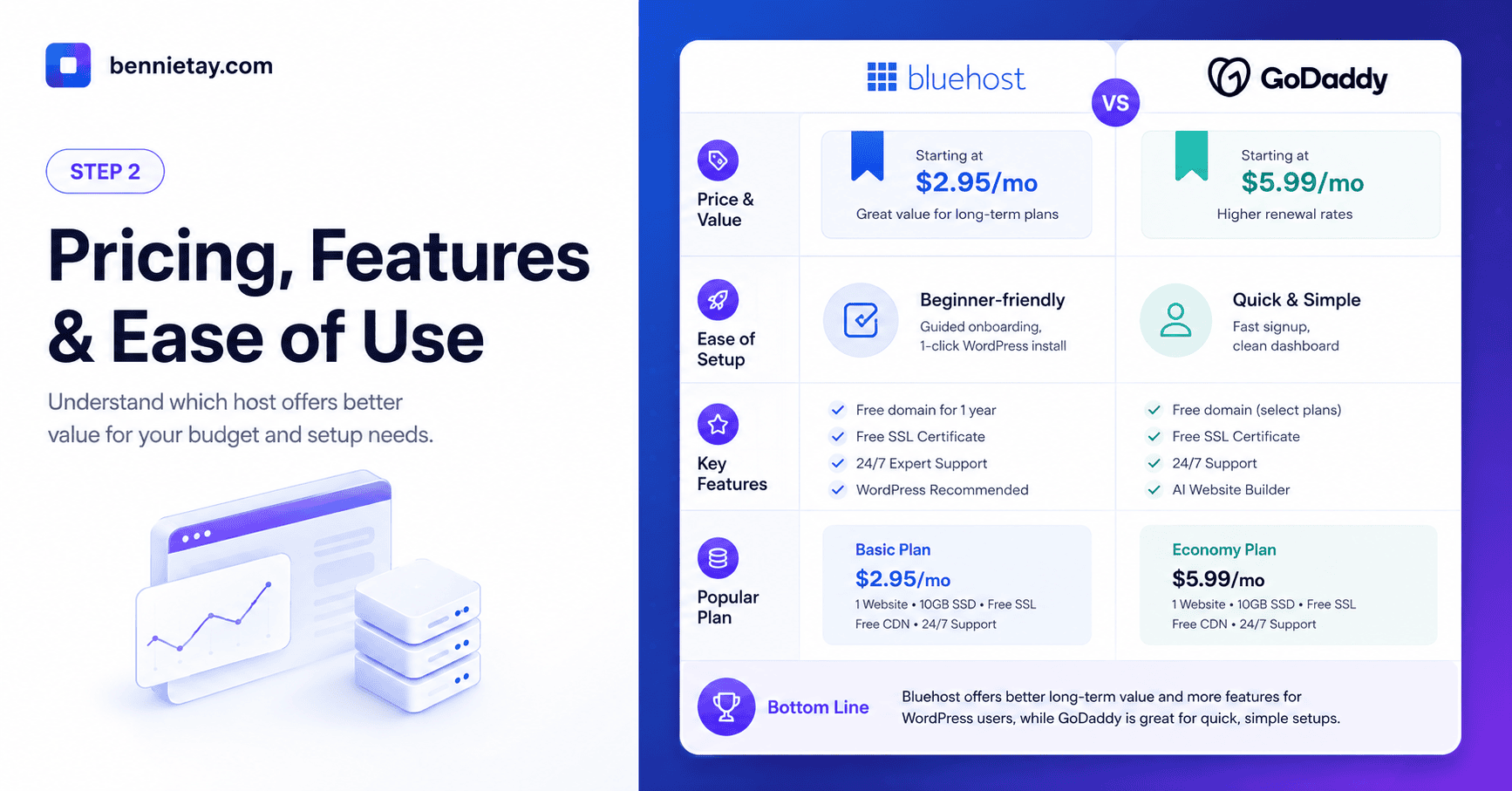
Ease of Use
Both Bluehost and GoDaddy are designed to be accessible to non-technical customers.
Bluehost Ease of Use
Bluehost presents a WordPress-oriented setup process. Users can choose a hosting plan, connect or register a domain, create the site, and manage WordPress through the hosting dashboard.
This is useful when WordPress is already the intended platform. The experience is less about choosing between many unrelated products and more about getting a WordPress website online.
Bluehost currently promotes AI-assisted site creation and managed WordPress tools as part of its hosting experience.
GoDaddy Ease of Use
GoDaddy provides a broader account interface that may include:
- Domains
- DNS settings
- Hosting
- Professional email
- SSL products
- Website security
- Website-building tools
- Marketing services
This can be convenient for a business already using several GoDaddy services. The owner can manage renewals, domain records, mailboxes, and hosting without maintaining separate accounts across multiple companies.
However, a broader platform can also mean more product choices and additional offers during setup. Review what is included and what is being sold separately.
Ease-of-Use Winner
- For a WordPress-first experience: Bluehost
- For managing domains and business tools together: GoDaddy
WordPress Hosting
Bluehost has made WordPress hosting one of its central product categories. Its current plans include managed WordPress updates and tools aimed at helping beginners create and operate a WordPress site.
GoDaddy also provides managed WordPress hosting. Its platform currently advertises automatic daily backups, backup retention, staging support, and WordPress management features.
When comparing plans, check:
- Number of websites allowed
- Storage allocation
- Traffic or visit guidance
- CDN availability
- Backup frequency and retention
- Staging access
- Malware scanning and cleanup
- WordPress update management
- Migration tools
- Support channels
- Renewal pricing
The phrase “managed WordPress hosting” does not guarantee that every management feature is included in every package. Apparently, adjectives can also have upgrade tiers.
Domain Registration and DNS Management
GoDaddy has the stronger domain-management identity.
Its domain platform connects registration with DNS controls, subdomains, email, website building, and hosting tools.
This can be useful for businesses managing:
- Multiple domain names
- Defensive domain registrations
- Country-specific domains
- Domain redirects
- Subdomains
- Email records
- Several websites or brands
Bluehost also offers domain registration and currently includes a first-year domain benefit with its WordPress hosting plans.
For someone operating one primary website, Bluehost’s domain tools may be sufficient. For a person managing a larger domain portfolio, GoDaddy may provide a more familiar and centralised workflow.
Remember that your domain and hosting do not need to be held by the same company. Keeping them separate can sometimes make future migrations easier, provided the accounts and renewal dates are managed carefully.
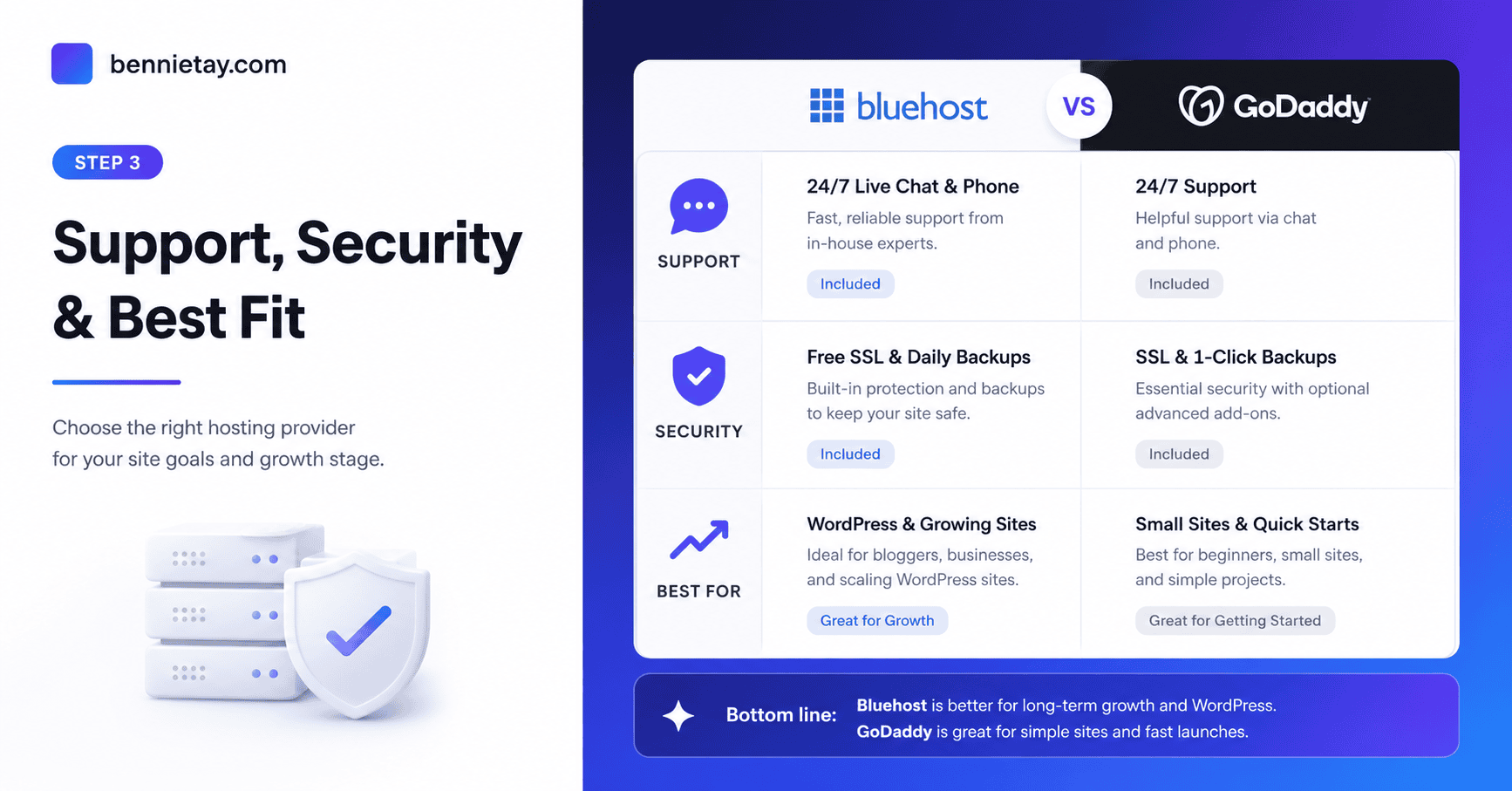
Professional Email
Business email should be compared separately from website hosting.
GoDaddy offers professional email products using custom domain addresses, such as name@yourcompany.com.
Bluehost also sells professional email services, with different mailbox features and renewal rates depending on the plan.
Before choosing either provider, confirm:
- Whether email is included or only offered temporarily
- Number of mailboxes
- Storage per mailbox
- Spam and malware protection
- Calendar and mobile access
- Renewal price per user
- Migration support
- Compatibility with Outlook or mobile applications
Do not assume that buying hosting automatically provides permanent professional email for the whole team. Hosting companies are perfectly capable of separating one simple business need into several renewable products.
Performance and Reliability
The hosting provider matters, but it is only one part of website performance.
Page speed is also affected by:
- Hosting plan resources
- Server location
- Full-page caching
- CDN configuration
- Theme quality
- Plugin efficiency
- Database queries
- Image sizes
- JavaScript and CSS
- Tracking scripts
- Traffic levels
GoDaddy currently advertises a 99.9% uptime guarantee for its standard web hosting and promotes unmetered bandwidth within that product category.
Bluehost’s current WordPress products promote CDN access, global data centres on some plans, managed updates, and different levels of storage and traffic capacity.
A lightweight, cached website on an entry-level plan can outperform a poorly built website on more expensive hosting. Changing hosts will not automatically fix oversized images, inefficient plugins, excessive scripts, or a bloated page builder.
For Malaysian and Southeast Asian Visitors
Businesses serving Malaysia should test performance from Kuala Lumpur or another nearby location.
Review:
- Server response time
- CDN performance
- Mobile loading speed
- Image delivery
- Form response
- Checkout speed
- Logged-in pages
- International routing
North American benchmark results may not represent the experience of users in Malaysia. Test the actual website from the region where customers live.
Security and Backups
A free SSL certificate is now a basic hosting requirement rather than a premium advantage.
Bluehost states that its hosting plans include SSL, while its WordPress products may include additional security and backup capabilities depending on the selected plan.
GoDaddy’s managed WordPress plans currently advertise daily backups with 30-day retention.
Compare:
- Automated backup frequency
- Retention period
- Manual backup creation
- One-click restoration
- Malware scanning
- Malware removal
- Firewall protection
- DDoS protection
- Login security
- Two-factor authentication
- Restoration fees
- Support during a security incident
Always maintain an independent off-site backup. The hosting account should not be the only place containing both your live website and every available backup.
The provider secures the hosting infrastructure, but the website owner must still update WordPress, remove abandoned plugins, control administrator access, and use strong passwords.
Pricing and Renewal Costs
Bluehost and GoDaddy commonly advertise introductory prices for the first billing term. The renewal cost may be considerably higher, and the lowest price may require a longer initial commitment.
Instead of comparing only the advertised monthly figure, calculate the total cost over two or three years.
Include:
- Hosting renewal
- Domain renewal
- Domain privacy
- Professional email
- Backup services
- Malware protection
- SSL, where applicable
- Migration assistance
- Additional websites
- Storage upgrades
- Ecommerce tools
GoDaddy publishes separate pricing across domains, hosting, email, and other services, while Bluehost also separates professional email and certain additional tools from its core hosting products.
Before paying, confirm:
- The length of the introductory term.
- The renewal price.
- Whether the domain is free only for year one.
- Which backup and security tools are included.
- Which checkout add-ons are optional.
- The cancellation and refund conditions.
- The cost of renewing email accounts.
The cheapest first-year option is not necessarily the least expensive long-term choice.
Customer Support
Support quality can vary by team, time, problem type, and hosting plan.
Bluehost currently advertises around-the-clock WordPress support with its WordPress hosting products.
GoDaddy advertises 24-hour technical support for its web hosting and also maintains a large hosting and WordPress help centre.
Before choosing a provider, ask:
- Is support available through chat, phone, or tickets?
- Are support hours suitable for Malaysia?
- Are WordPress plugin problems included?
- Can support restore backups?
- How are urgent outages escalated?
- Is migration help included?
- Does support investigate performance issues?
- Is malware cleanup included or chargeable?
Basic hosting support may confirm that the server is working without diagnosing an inefficient theme or plugin. Understand where server support ends and website-development work begins.
Website Migration
WordPress websites can be moved between Bluehost and GoDaddy.
Bluehost currently promotes a self-service migration tool, while GoDaddy provides migration and managed WordPress support resources.
A safe migration process should include:
- Create a complete file and database backup.
- Record all DNS records.
- Identify email services and mail records.
- Copy the website to the new host.
- Test it using a temporary address.
- Check forms, payments, login, search, and analytics.
- Confirm SSL and redirects.
- Update DNS only after testing.
- Monitor errors and traffic.
- Keep the old hosting active until verification is complete.
A rushed DNS change can cause downtime, missing email, broken forms, or lost transactions. Migrating carefully is less dramatic, which is exactly what infrastructure work should be.
Bluehost Is Better When…
Bluehost is likely to be the better fit when:
- You are creating your first WordPress website.
- You want a WordPress-centred dashboard.
- You prefer guided site setup.
- You operate a blog, portfolio, or small business site.
- You do not manage a large domain portfolio.
- The selected plan’s renewal price suits your budget.
- You want hosting to be the main service rather than part of a larger product ecosystem.
GoDaddy Is Better When…
GoDaddy may be the better fit when:
- You already manage important domains there.
- Your DNS records are already configured through GoDaddy.
- You use GoDaddy professional email or business tools.
- You want domains, email, hosting, and security in one account.
- Its managed WordPress plan includes the staging, backup, and security tools you require.
- Consolidated billing is more valuable than a WordPress-focused experience.
Convenience is useful, but it should not prevent you from comparing the total cost and actual hosting features.
Final Recommendation
Bluehost is usually the clearer choice for a beginner who wants to launch a WordPress website with a focused setup process.
GoDaddy is a practical option for a business already invested in its domain, DNS, email, or website-services ecosystem.
Choose Bluehost when WordPress onboarding and simplicity are the priorities.
Choose GoDaddy when managing several online services within one provider reduces meaningful administrative work.
In both cases:
- Compare renewal costs rather than introductory discounts.
- Confirm what is included in the exact plan.
- Maintain independent backups.
- Test performance from your audience’s location.
- Audit the website before blaming the host for poor speed.
The best provider is not necessarily the one with the largest discount. It is the one that delivers the required performance, support, security, and management tools at a sustainable long-term cost.
Suggested internal links:
- Bluehost Hosting Plans Explained
- Shared Hosting vs VPS Hosting
- How to Handle High Traffic on WordPress
- How to Increase the WordPress Memory Limit
- How to Speed Up a WordPress Website
Suggested call to action:
Need help choosing or improving your WordPress hosting setup? Request a website audit to identify hosting limitations, speed problems, plugin conflicts, security gaps, and opportunities to improve lead generation.
Frequently Asked Questions
Is Bluehost Better Than GoDaddy?
Bluehost is generally better suited to beginners who want a WordPress-focused setup. GoDaddy may be more convenient for users who already manage domains, email, DNS, and other services through its platform.
Which Is Cheaper Long Term?
The answer depends on the selected plans, billing periods, renewal prices, email accounts, domain costs, backups, and security add-ons.
Compare the complete cost over at least two years rather than relying on the introductory monthly price.
Can I Move From GoDaddy to Bluehost?
A WordPress website can be migrated from GoDaddy to Bluehost. Back up the files and database, copy the website, test it on the new host, and update DNS only after confirming that everything works.
Can I Move From Bluehost to GoDaddy?
WordPress can also be moved from Bluehost to GoDaddy. Review email, DNS, SSL, scheduled tasks, forms, and redirects as part of the migration.
Which Provider Is Better for WordPress?
Bluehost provides a more WordPress-centred onboarding experience. GoDaddy also offers managed WordPress hosting with backups and staging on supported plans. The better choice depends on the required resources and workflow.
Which Provider Is Better for Domains?
GoDaddy has the stronger domain-management focus and connects domains with DNS, email, hosting, and website tools. Bluehost remains sufficient for users managing one or a few domains.
Does Changing Hosts Improve SEO?
Changing hosts can support SEO when it improves speed, uptime, stability, or server response time.
A migration can also create temporary SEO problems if it causes downtime, broken redirects, blocked crawling, certificate errors, or missing pages. Test the website thoroughly and preserve its URL structure.
Should I Keep My Domain and Hosting Together?
Keeping them together can simplify account management. Keeping them separate can make future hosting changes easier.
Either approach can work when account access, renewals, DNS records, and security are managed properly.