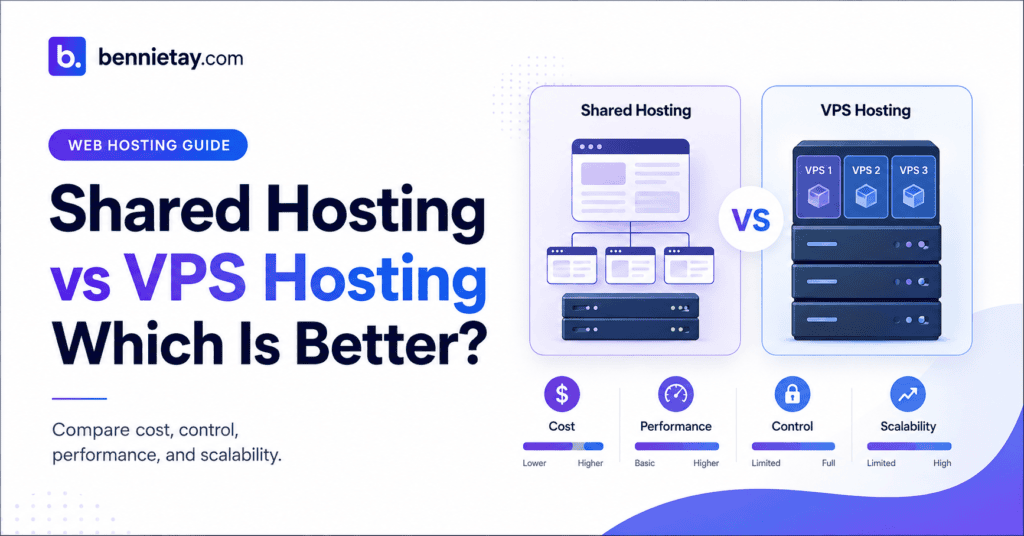
Choosing between shared hosting and VPS hosting can affect your website’s speed, reliability, security, flexibility, and long-term operating cost.
The decision is often presented as a simple comparison between a cheap entry-level option and a more powerful premium service. In reality, the right choice depends on what your website does, how much traffic it receives, how important it is to your business, and how much technical responsibility you are willing to manage.
A small business website that displays services, publishes occasional blog posts, and collects enquiries may run perfectly well on quality shared hosting. A busy ecommerce store, membership platform, application, or high-value lead-generation website may need the more predictable resources of a virtual private server.
Paying for a VPS before you need one can add unnecessary cost and complexity. Remaining on shared hosting after your website has outgrown it can lead to slow pages, failed background tasks, downtime, and lost sales.
This guide explains the practical differences between shared hosting and VPS hosting, including performance, security, scalability, management, SEO, and cost. It will also help you identify when upgrading is genuinely necessary.
Shared Hosting vs VPS Hosting: The Main Difference
The main difference is how server resources are allocated and managed.
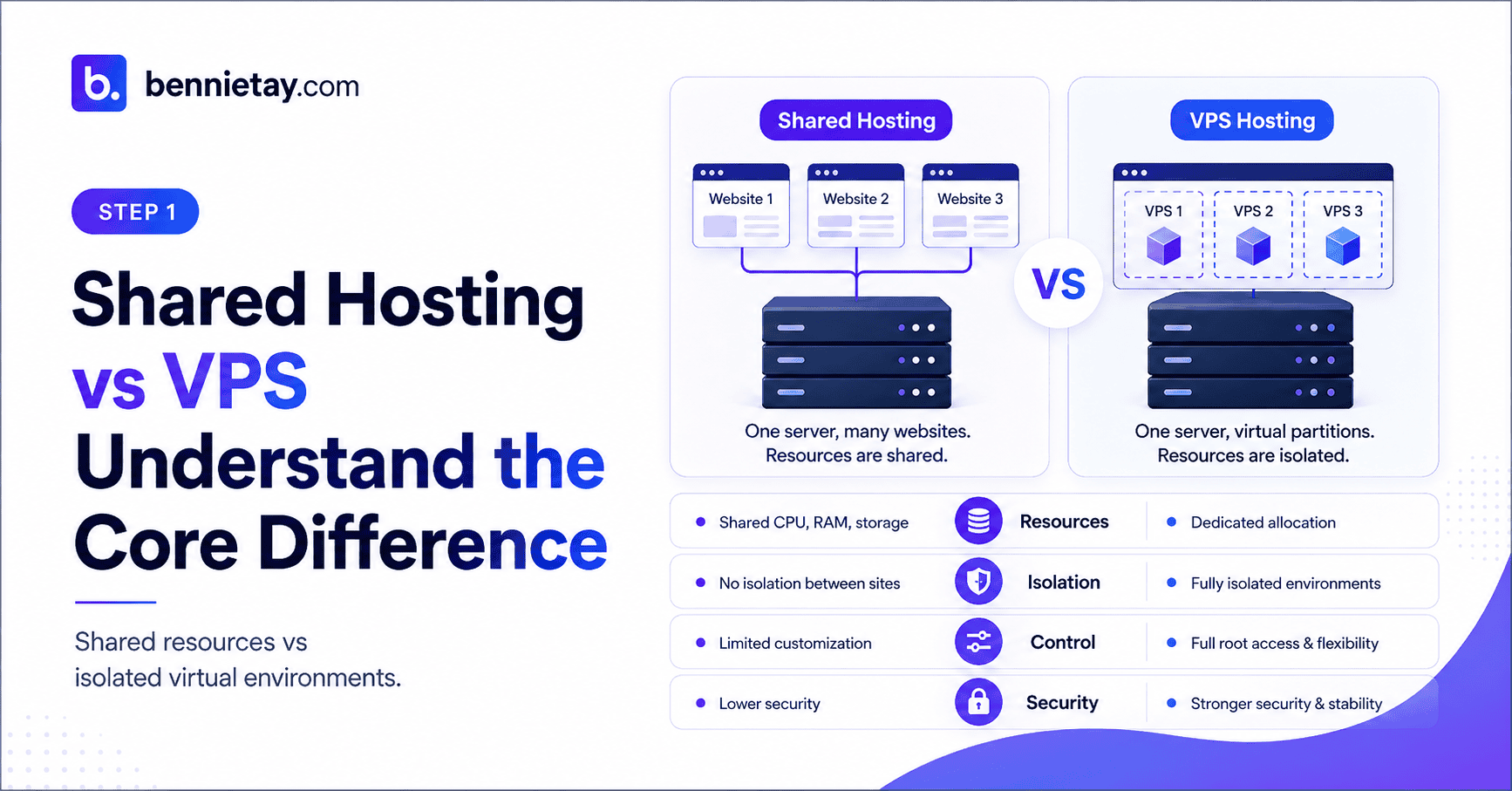
With shared hosting, many websites use the same physical server and share its CPU, memory, storage, and network capacity. The hosting company controls the operating system and most server settings.
With VPS hosting, a physical server is divided into multiple isolated virtual environments. Each VPS receives an allocated amount of CPU, memory, storage, and other resources. The underlying hardware is still shared, but your virtual server operates more independently.
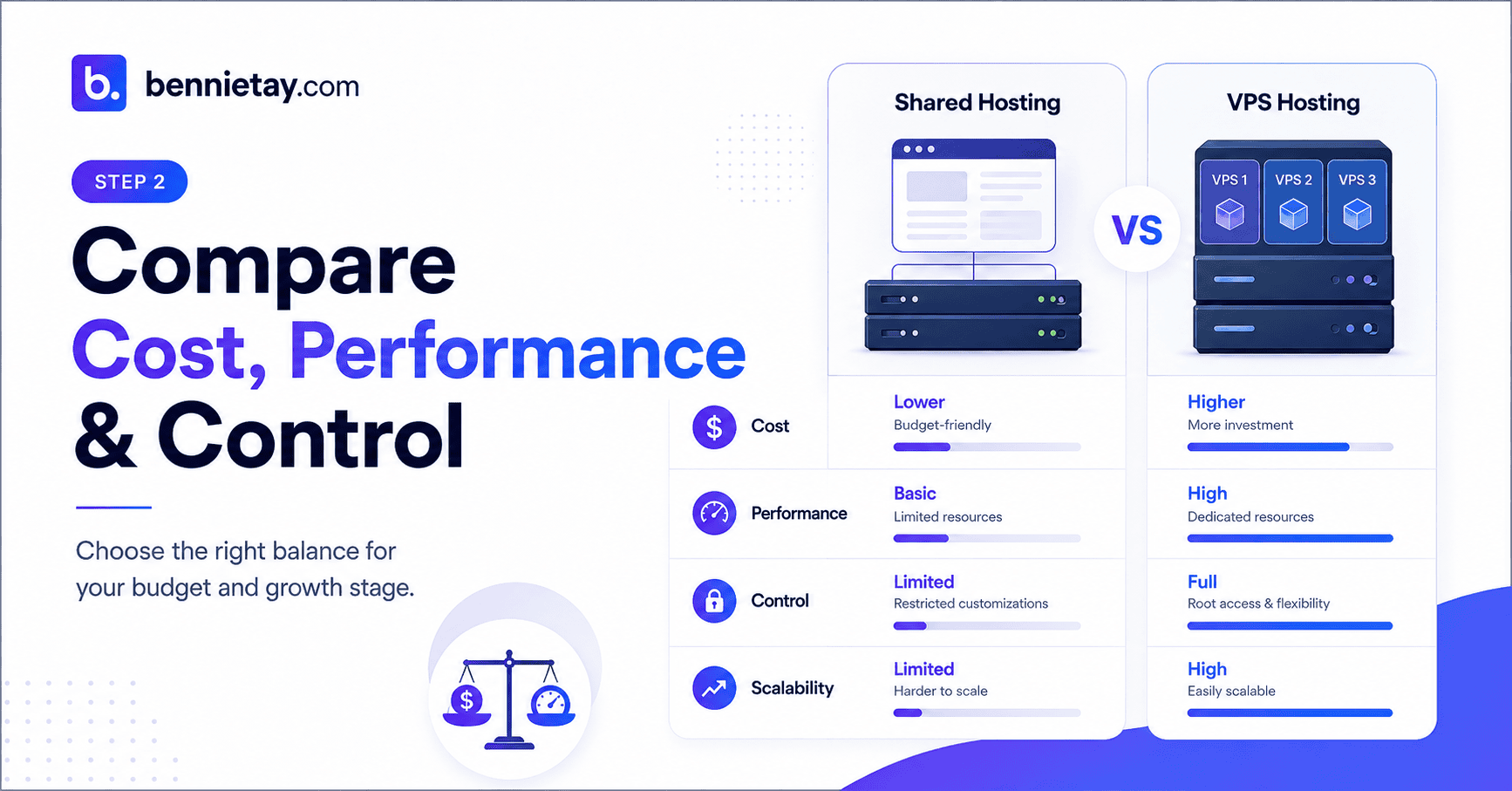
Shared hosting is usually easier and cheaper. VPS hosting provides greater control and more consistent performance, but it normally costs more and may require additional technical management.
For most new blogs, portfolios, local business sites, and brochure websites, shared hosting is the sensible starting point.
A VPS becomes more attractive when the website receives sustained traffic, processes transactions, runs resource-intensive tasks, or requires server-level configuration that shared hosting cannot provide.
What Is Shared Hosting?
Shared hosting places multiple customer accounts on a single physical server.
Each website uses a portion of the server’s resources. The provider manages the server software, operating system, maintenance, updates, hardware, and much of the security configuration.
This arrangement allows hosting companies to divide the cost of the infrastructure across many customers. As a result, shared hosting is usually the most affordable way to host a WordPress website.
Most shared hosting plans include a control panel, WordPress installation tools, SSL certificates, email accounts, file management, basic backups, and customer support. The exact features depend on the host and package selected.
For someone launching a first website, this can be extremely convenient. There is no need to configure Linux, install a web server, manage firewall rules, or monitor operating-system updates.
The provider handles most of the infrastructure while the website owner focuses on content, design, products, and marketing.
Who Is Shared Hosting Best For?
Shared hosting works well for websites with relatively light and predictable workloads.
A local service company, consultant, restaurant, clinic, tuition centre, property agent, freelancer, or small retailer may only need a website that displays information and collects enquiries.
A portfolio, personal blog, event website, landing page, or early-stage business site may also perform well on shared hosting, provided it is properly built and optimised.
The website does not need to be tiny. A well-cached WordPress website with compressed images and a lightweight theme can serve a substantial number of visitors without requiring a VPS.
Traffic volume alone does not determine hosting requirements. A simple cached website can often handle more visits than a poorly optimised site running complex plugins and background processes.
Shared hosting is therefore suitable when the website mainly contains public pages, receives modest traffic, and does not require advanced server configuration.
The Benefits of Shared Hosting
The biggest advantage of shared hosting is affordability.
Entry-level plans are usually inexpensive, making them suitable for new businesses and website owners who do not yet know how much traffic or revenue the site will generate.
Shared hosting is also easier to operate. The hosting company handles server maintenance, security patches, software updates, hardware failures, and network management.
Many providers include WordPress installation, SSL certificates, email hosting, backups, and technical support in one package. This reduces the number of separate services the website owner must manage.
A good shared hosting plan can provide everything needed for a professional small business website without creating unnecessary technical work.
For a simple website, this convenience often matters more than having access to advanced server controls that will never be used.
The Limitations of Shared Hosting
The main disadvantage is that resources are shared.
If other accounts on the same server consume excessive CPU, memory, or network capacity, your website may experience slower performance. Reputable hosts use account isolation and resource controls to reduce this problem, but the infrastructure remains shared.
Shared plans also impose limits on CPU usage, PHP workers, memory, storage input and output, database connections, execution time, and background processes.
These restrictions may not be noticeable on a small website. They become more important when traffic grows or the site performs demanding work.
Large imports, backups, malware scans, product synchronisation, report generation, image processing, and heavy ecommerce operations may exceed shared-hosting limits.
Server configuration is also restricted. You may not be able to install custom software, change certain PHP or web-server settings, configure private networking, or run specialised background services.
When a website grows beyond the available limits, moving to another plan or server becomes necessary.
What Is VPS Hosting?
VPS stands for virtual private server.
Virtualisation software divides one physical server into several isolated virtual servers. Each VPS operates with its own allocated resources and can have its own operating system, software, settings, and user accounts.
Your website still shares the physical hardware with other VPS customers, but the environments are separated more clearly than on traditional shared hosting.
A VPS may receive a defined amount of RAM, virtual CPU capacity, and storage. This can provide more predictable performance because your website is not relying on the same general pool of resources used by dozens or hundreds of unrelated websites.
VPS hosting also provides greater control. Depending on the plan, you may be able to choose the operating system, configure PHP, install server software, manage databases, create custom firewall rules, and control how services run.
That flexibility is valuable, but it also introduces responsibility.
Managed VPS vs Unmanaged VPS
One of the most important distinctions is whether the VPS is managed or unmanaged.
With managed VPS hosting, the provider handles many server-level tasks. These may include operating-system updates, security patching, monitoring, backups, server optimisation, control-panel maintenance, and technical troubleshooting.
Managed VPS hosting is generally the safer choice for business owners who need more resources but do not want to become server administrators.
An unmanaged VPS gives the customer greater control, but the customer is responsible for configuring and maintaining the environment.
This can involve setting up the web server, installing PHP, securing SSH access, configuring a firewall, monitoring logs, managing backups, applying patches, renewing certificates, and responding to security incidents.
Unmanaged VPS hosting may appear cheaper, but the real cost includes the time and expertise required to operate it properly.
One missed security update or failed backup can cost considerably more than the monthly saving.
For most small and medium-sized businesses, a managed VPS is the more practical option when an upgrade is genuinely required.

The Benefits of VPS Hosting
A VPS provides more consistent access to server resources.
Because memory and CPU capacity are allocated more clearly, the website is less likely to be affected by unrelated accounts on the same hardware.
This makes VPS hosting suitable for websites that receive sustained traffic or perform resource-heavy operations.
A VPS also provides greater control over server configuration. Developers can install specific software, choose PHP versions, adjust resource limits, configure background services, and optimise the environment for a particular application.
Scaling is generally more flexible. Many providers allow customers to increase memory, CPU, or storage without rebuilding the entire website.
This can make a VPS useful for growing ecommerce stores, membership sites, online learning platforms, directories, web applications, and high-traffic WordPress installations.
The additional isolation may also support stricter security or compliance requirements, although a VPS is only secure when it is configured and maintained properly.
The Limitations of VPS Hosting
The most obvious disadvantage is cost.
VPS plans are more expensive than shared hosting, particularly when management, backups, monitoring, security tools, and a control panel are included.
A VPS may also require more technical knowledge. Even a managed plan can involve decisions about server resources, caching, deployment, databases, and scaling.
An unmanaged VPS creates considerably more responsibility. Poor configuration can make the website slower, less secure, and less reliable than it was on shared hosting.
More resources do not automatically produce better performance. A badly configured VPS with no caching and an overloaded database can perform worse than a well-managed shared hosting account.
Businesses should therefore avoid upgrading simply because “VPS” sounds more professional. Hosting labels do not possess magical properties, despite what certain pricing pages would like everyone to believe.
When Should You Choose Shared Hosting?
Choose shared hosting when the website has a straightforward purpose and moderate technical requirements.
This is often the right option when the site mainly provides information, publishes content, displays a portfolio, or collects leads through forms.
It is especially suitable for new businesses that are still validating their offer and do not need to pay for unused server capacity.
Before moving away from shared hosting, improve the website itself.
Enable full-page caching, compress images, remove unnecessary plugins, reduce heavy scripts, optimise the database, and use a lightweight theme.
These changes can significantly improve performance without increasing monthly hosting costs.
A slow website is not always evidence that the server is too small. It may be caused by oversized media, poor code, inefficient plugins, missing caching, or excessive third-party tools.
Upgrade only after monitoring shows that the hosting account is the actual bottleneck.
When Is VPS Hosting Worth the Cost?
A VPS becomes worthwhile when shared hosting can no longer support the website’s workload reliably.
Common warning signs include repeated CPU or memory limit notifications, slow dashboard performance, delayed checkout pages, failed backups, incomplete imports, and recurring downtime during traffic spikes.
The website may also need a VPS when background jobs cannot finish within shared-hosting limits or when PHP workers are regularly exhausted.
Businesses may need greater control for custom applications, server-side processing, scheduled jobs, private networking, staging environments, or specialised software.
Ecommerce websites often benefit from more predictable resources because carts, checkout pages, customer accounts, inventory systems, and payment integrations require dynamic processing.
The financial calculation should include the cost of poor performance.
If slow pages cause abandoned checkouts, lost enquiries, failed transactions, or employee downtime, the cost of better hosting may be easy to justify.
How Much Traffic Can Shared Hosting Handle?
There is no universal visitor limit for shared hosting.
A provider may advertise a suggested number of monthly visits, but the real capacity depends on how those visits behave.
A five-page business website served from a full-page cache can handle far more traffic than an uncached WooCommerce store processing personalised customer sessions.
Concurrent visitors matter more than monthly totals. Ten thousand visits spread across a month create less pressure than ten thousand visits arriving within one hour.
Page complexity also matters. Large images, database queries, plugins, bots, scripts, and background jobs all increase the amount of work required for each request.
Instead of relying on a generic visitor estimate, monitor server response time, CPU usage, memory, PHP worker availability, error logs, uptime, and database performance.
Upgrade when these measurements show sustained pressure rather than a temporary spike or an optimisation problem.
Shared Hosting vs VPS for WordPress
WordPress can run well on both shared hosting and VPS hosting.
A small WordPress site may not benefit noticeably from a VPS. If the site is properly cached and uses efficient plugins, quality shared hosting may provide all the performance it needs.
A complex WordPress site may benefit more from VPS resources, especially when it includes WooCommerce, membership features, large databases, scheduled processing, or custom code.
However, moving WordPress to a VPS does not remove the need for optimisation.
Themes, plugins, database queries, images, scripts, cron jobs, and caching still affect performance.
A VPS gives the website more capacity and control. It does not automatically repair inefficient software.
Security: Is VPS Safer Than Shared Hosting?
A VPS is not automatically more secure than shared hosting.
On reputable shared hosting, the provider manages server security, updates, account isolation, monitoring, and infrastructure protection. This can be safer for users with limited technical knowledge because important server tasks are handled by specialists.
A VPS offers stronger separation and more control, but that control creates responsibility.
An unmanaged VPS with outdated software, weak SSH security, poor firewall rules, and unreliable backups can be extremely vulnerable.
Managed VPS hosting can provide stronger isolation without transferring every technical task to the customer.
Regardless of hosting type, website owners should keep WordPress, plugins, and themes updated, use strong passwords, enable two-factor authentication, limit administrator accounts, and maintain independent backups.
The safest option is the one that is managed competently.
Which Hosting Option Is Better for SEO?
Google does not rank a website higher simply because it uses VPS hosting.
Hosting affects SEO indirectly through page speed, uptime, crawl reliability, server response time, and user experience.
A fast, stable website on shared hosting can rank extremely well. A poorly configured VPS can produce slow pages, errors, and downtime that harm search performance.
The best SEO hosting is therefore the least complicated option that meets the website’s real requirements reliably.
Start with strong website fundamentals. Use efficient code, page caching, compressed images, mobile-friendly design, and a reliable CDN where appropriate.
Move to a VPS when the current hosting environment prevents the website from remaining fast and available under normal traffic.
Can You Move From Shared Hosting to VPS Later?
Yes. Moving from shared hosting to a VPS is a common upgrade path.
Many hosting providers offer migration tools or assisted migration services. A WordPress website can usually be transferred by copying its files and database, updating configuration, testing the new environment, and changing DNS records.
Create an independent backup before the migration and keep the original hosting active until the new website has been tested.
Verify contact forms, login, search, analytics, redirects, scheduled tasks, email delivery, ecommerce checkout, and payment processing before completing the switch.
Do not change DNS first and test later. Turning customers into unpaid infrastructure testers is rarely the hallmark of a thoughtful migration strategy.
How to Choose the Right Hosting Plan
Begin with the website’s actual workload.
Consider how many visitors arrive at the same time, whether most pages can be cached, how many plugins are installed, and whether the site runs ecommerce, memberships, imports, reports, backups, or scheduled jobs.
Think about the business impact of downtime. A personal blog can tolerate occasional disruption more easily than an online store processing daily sales.
Review your need for server control. Shared hosting may be enough when you only need WordPress, email, SSL, and a control panel. A VPS is more appropriate when developers need custom server software, advanced access, or specific configurations.
Finally, consider who will manage the infrastructure.
An unmanaged VPS is not a sensible choice when nobody is responsible for updates, monitoring, security, and backups.
Final Recommendation
For most new small business websites, quality shared hosting is the right place to begin.
It is affordable, easy to manage, and capable of supporting professional WordPress websites when caching, images, themes, and plugins are properly optimised.
Choose a managed VPS when the website produces meaningful revenue, receives sustained traffic, runs demanding applications, or repeatedly reaches shared-hosting resource limits.
A VPS is also suitable when custom server configuration, predictable resources, or stronger isolation is required.
Do not upgrade based on assumptions, marketing labels, or a single slow page. Measure performance, improve the website, and confirm that hosting resources are the constraint.
The best hosting plan is not the most powerful option available. It is the simplest environment that keeps the website fast, secure, stable, and ready for growth without creating unnecessary cost or technical complexity.
For businesses that prefer not to manage hosting, updates, security, backups, and performance separately, a fully managed website service can provide a simpler alternative. The website can be built, hosted, maintained, and improved as one ongoing service instead of leaving the business to coordinate several providers and tools.
Frequently Asked Questions
Is VPS hosting always faster than shared hosting?
No. A VPS provides more predictable resources and greater control, but real speed still depends on server configuration, caching, database performance, themes, plugins, images, and scripts.
Is shared hosting suitable for a business website?
Yes. Shared hosting can be suitable for a small business website when the site is lightweight, properly cached, and receives modest traffic. Choose a reputable provider with adequate security, backups, support, and resource limits.
Can I upgrade from shared hosting to VPS later?
Yes. Most websites can be migrated from shared hosting to a VPS. Keep a complete backup and test the new environment before changing the domain’s DNS records.
Is shared hosting secure?
Reputable shared hosting can be secure when the provider isolates customer accounts and maintains the server properly. Website owners must still update WordPress, themes, plugins, and passwords.
Is a VPS more secure?
A VPS can provide better isolation, but it is not automatically safer. An unmanaged VPS that is not patched or monitored may be less secure than professionally managed shared hosting.
Do I need a VPS for WooCommerce?
Not necessarily. A small WooCommerce store may run well on quality shared or managed WordPress hosting. A VPS becomes more useful as traffic, product volume, checkout activity, integrations, and background processing increase.
How do I know when shared hosting is no longer enough?
Look for recurring CPU or memory warnings, slow dynamic pages, exhausted PHP workers, failed background tasks, downtime during traffic spikes, and consistent resource pressure shown in hosting reports.
Does VPS hosting improve SEO?
Not directly. A VPS may support SEO when it improves speed, stability, and uptime, but search rankings also depend on content quality, crawlability, mobile usability, internal linking, backlinks, and competition.
Should a small business choose managed or unmanaged VPS hosting?
Most small businesses should choose managed VPS hosting. Unmanaged hosting is more suitable for teams with the technical expertise and time to maintain the operating system, security, monitoring, and backups.