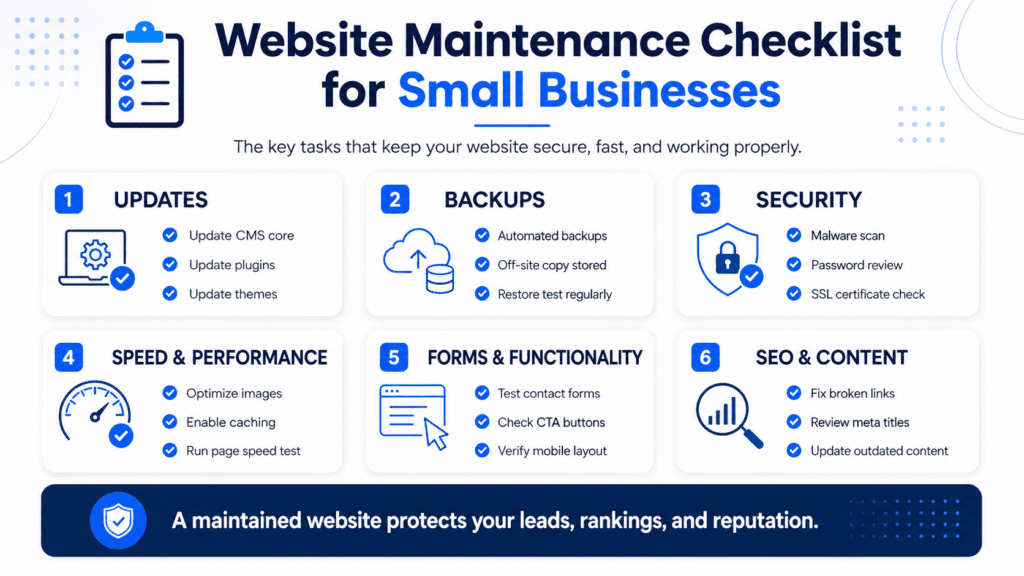
Launching a website is not the end of the job. It is the beginning of keeping the website useful, secure, fast, updated, and capable of helping your business generate enquiries.
Many small business owners treat their website like a one-time project. They build it, publish it, and then leave it untouched for months or even years. At first, everything may seem fine. But over time, pages become outdated, forms stop working, plugins need updates, images slow the site down, links break, and customers start seeing information that no longer matches the business.
A website that is not maintained can quietly damage trust.
Visitors may see outdated pricing, old services, broken pages, slow loading times, or contact forms that do not work. They may not tell you there is a problem. They may simply leave and contact someone else. Very efficient, in the worst possible way.
This website maintenance checklist explains what small businesses should review regularly, why maintenance matters, and how to keep your website working as a reliable business asset instead of an abandoned digital brochure.
What Is Website Maintenance?
Website maintenance is the ongoing process of checking, updating, fixing, and improving your website after it has launched. It includes technical tasks, content updates, security checks, performance reviews, SEO improvements, and user experience testing.
A maintained website should stay accurate, secure, mobile-friendly, fast, and easy to use. It should also continue to support your current business goals. Website maintenance is not only about preventing problems. It is also about improving the website over time so it can keep generating enquiries, bookings, calls, sales, or leads.
For small businesses, maintenance matters because your website is often one of the first places customers go before deciding whether to contact you.
Why Website Maintenance Matters for Small Businesses
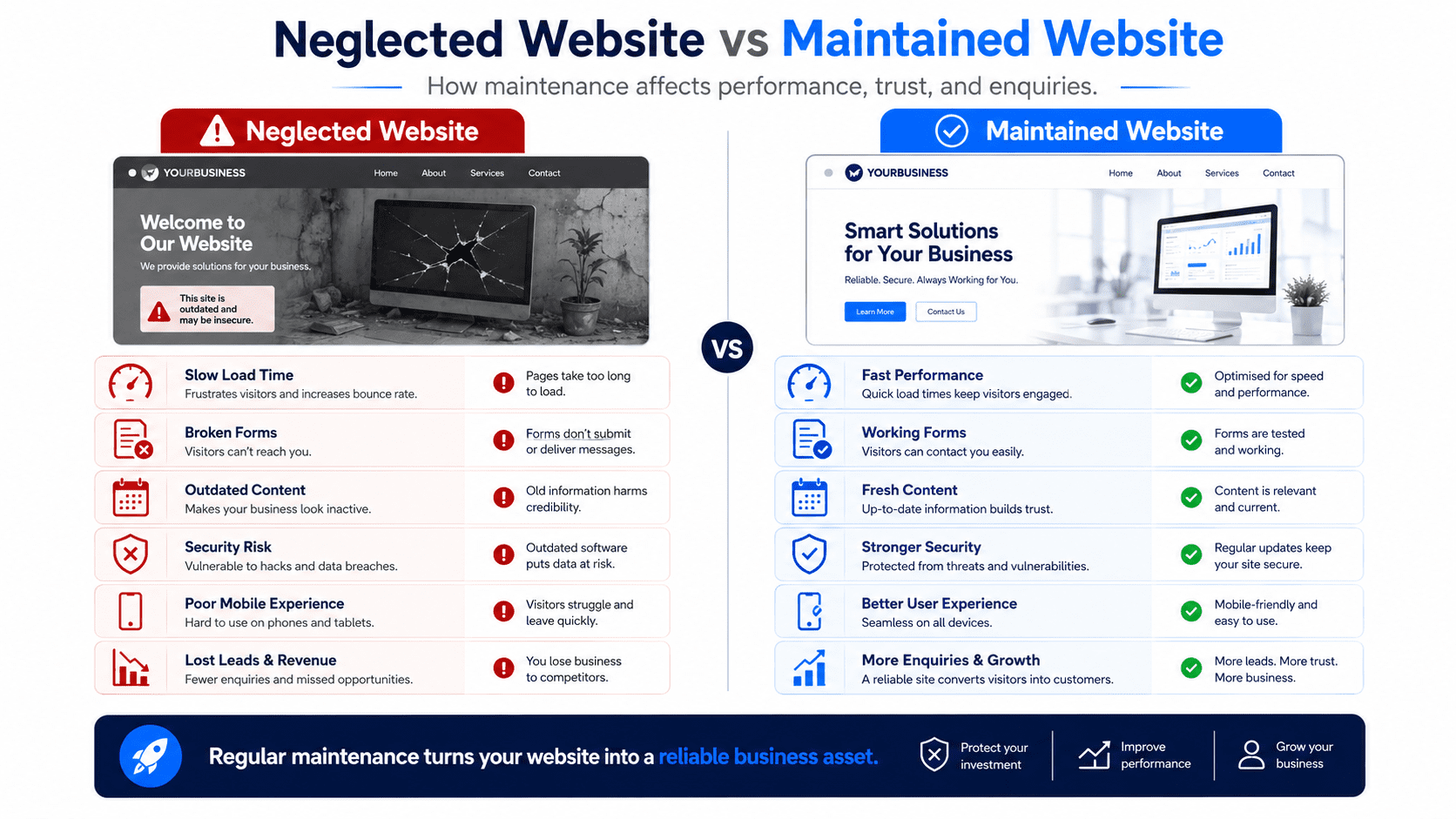
A small business website has a job to do. It should explain your offer clearly, build trust, and help visitors take action. If the website is outdated or broken, it can hurt the customer experience before you ever speak to the person.
A poorly maintained website can create several problems. It can make your business look inactive. It can reduce trust. It can affect your Google rankings. It can slow down the website. It can create security risks. It can stop enquiries from coming through. It can also waste paid advertising traffic if people click your ads and land on a poor page.
That is why website maintenance should not be treated as an optional extra. It is part of running a professional online presence.
You would not leave your shop sign broken, your phone disconnected, and your price list from three years ago on the counter. Yet somehow websites get that exact treatment, just with more pixels.
How Often Should You Maintain Your Website?
Website maintenance should happen regularly, not only when something breaks.
Some tasks should be checked weekly, such as making sure forms work and reviewing important enquiries. Other tasks can be done monthly, such as updating plugins, checking page speed, reviewing analytics, and fixing broken links.
Larger tasks, such as reviewing content, updating SEO pages, refreshing testimonials, and improving conversion sections, can be done every quarter.
A small business website does not need daily rebuilding. But it does need consistent care.
A good maintenance rhythm helps you catch issues early before they turn into lost customers.
Check That Contact Forms Are Working
Your contact form is one of the most important parts of your website.
If the form stops working, you may lose enquiries without realizing it. This is especially dangerous because visitors usually will not email you to say, “Your form is broken.” They will just leave, because apparently customers prefer solving their own problem by hiring someone else.
Test your forms regularly.
Submit a test enquiry and make sure it reaches the correct email inbox. Check whether the confirmation message appears properly. Make sure the form works on desktop and mobile. If you use a CRM, email automation, or notification system, confirm that the lead is being captured correctly.
Also review the form itself. If it asks too many questions, visitors may abandon it. Most small business enquiry forms only need the basics: name, contact details, service interest, and message.
A working form is basic. A simple form is better. A form that actually brings enquiries to the right place is the bare minimum civilization should have achieved by now.
Test Phone, WhatsApp, Email, and Booking Links
Many small business websites include phone numbers, WhatsApp buttons, email links, and booking buttons.
These links should be tested regularly.
A click-to-call button should open the correct phone number on mobile. A WhatsApp link should open a message to the right number. An email link should address the correct inbox. A booking button should lead to the correct calendar or appointment page.
Small errors can cost enquiries.
For example, if your WhatsApp link points to an old number, or your booking calendar no longer accepts appointments, visitors may assume your business is not responsive.
These are small checks, but they directly affect lead generation.
Update Your Business Information
Your website should reflect your current business.
If your opening hours, phone number, email address, address, service area, pricing, or team details have changed, your website should be updated quickly.
Outdated information creates confusion and reduces trust.
For local businesses, consistent contact details also matter for local SEO. Your business name, address, phone number, and service area should match across your website, Google Business Profile, directories, and social profiles where relevant.
If a customer sees one price on your website, another price in your brochure, and a different price when they contact you, they may start wondering what else is inconsistent.
That is not ideal, unless your business strategy is “keep them guessing.” Bold. Bad, but bold.
Review Your Services and Offers
Small businesses change over time. You may add new services, remove old ones, update packages, adjust pricing, or change your target customers. Your website should keep up with those changes.
Review your services page and individual service pages regularly. Make sure every service listed is still available. Check whether descriptions still match what you deliver. Update package names, included features, turnaround times, and pricing guidance if they have changed.
If you are promoting a service that you no longer want to sell, your website may attract the wrong enquiries.
If you have launched a new high-value service but it is not on your website, you may be missing opportunities.
Your website should sell what your business actually wants to sell now, not what it happened to sell when the website was first built.
Check Website Speed
Website speed affects user experience, SEO, and conversions. If your website loads slowly, visitors may leave before they read your offer. This is especially true on mobile, where people have less patience and sometimes weaker connections. Slow websites are often caused by large images, too many plugins, poor hosting, heavy scripts, outdated themes, large videos, and unnecessary animations.
Check your website speed regularly, especially after adding new images, videos, plugins, tracking scripts, or design sections. If your website feels slow, start with the most common issue: images. Compress them, resize them properly, and use modern formats where possible.
A beautiful website that loads slowly is still a problem. It is basically a locked shop with attractive curtains.
Keep Your Website Mobile-Friendly
Many visitors will view your website from a phone. That means your website must be easy to read, scroll, tap, and use on mobile devices. Check your most important pages on a real phone, not just in a desktop preview tool. Look at the homepage, services page, pricing page, contact page, blog posts, and landing pages.
Make sure the text is readable. Buttons should be easy to tap. Forms should be simple. Images should not be awkwardly cropped. The menu should work properly. Contact options should be easy to find.
For local businesses, mobile experience is especially important because customers often search while they are ready to call, book, or visit. If your mobile website is difficult to use, you are making customers work too hard. And customers, tragically, have alternatives.
Update Website Software, Plugins, and Themes
If your website runs on a content management system such as WordPress, it may use themes, plugins, and software that need regular updates.
Updates can improve security, performance, compatibility, and functionality.
Ignoring updates can create problems. Your website may become vulnerable to security issues, features may stop working, or plugins may conflict with each other.
Before updating important plugins or themes, it is smart to back up your website. That way, if something breaks, you can restore it.
If you are not comfortable handling updates yourself, it may be better to have a developer, website maintenance provider, or managed website plan handle it for you.
This is one of the reasons Website-as-a-Service can be useful. The business owner gets the website without having to pretend they enjoy plugin maintenance. Nobody enjoys plugin maintenance. Some people just bill for it.
Back Up Your Website
Website backups protect you if something goes wrong.
A website can break because of a bad update, hosting issue, accidental deletion, security problem, or technical error. Without a backup, recovery can be much harder.
Your website should be backed up regularly.
For active websites, weekly or daily backups may be appropriate. For smaller websites that do not change often, monthly backups may be enough. The right frequency depends on how often your site is updated and how important it is to your business.
Make sure backups are stored somewhere safe and can actually be restored.
A backup that has never been tested is more like a hopeful rumor than a recovery plan.
Check Website Security
Security matters even for small business websites.
Some business owners assume their website is too small to be targeted. Unfortunately, automated attacks do not care whether your business is famous. They scan for weak websites at scale because apparently even robots have decided to become pests.
Basic website security includes strong passwords, updated software, secure hosting, SSL certificates, spam protection, limited admin access, and regular monitoring.
You should also check that your website uses HTTPS. Visitors should not see a “not secure” warning in their browser.
If your website collects enquiries, customer information, payments, or login details, security becomes even more important.
A secure website protects both your business and your customers.
Fix Broken Links
Broken links create a poor user experience.
They can happen when pages are deleted, URLs are changed, external websites move content, or old blog posts link to outdated resources.
Check your website for broken links regularly.
Pay attention to navigation links, CTA buttons, footer links, blog links, service page links, contact buttons, booking links, and external references.
A broken link may seem small, but if it appears on an important button, it can directly cost you leads.
Nothing says “trust us with your business” quite like a button that goes nowhere. Truly inspiring.
Review Your Calls to Action
Your calls to action should match your current business goals.
If your homepage still says “Learn More” when you actually want visitors to book a consultation, your CTA may be too weak. If your website promotes an old offer, outdated package, or inactive booking link, it needs to be updated.
Review the CTA buttons across your website.
Your main CTA should be specific and action-focused. For example, “Request a Free Quote,” “Book a Free Consultation,” “Send WhatsApp Message,” “View Website Plans,” or “Schedule an Appointment” is usually stronger than “Click Here” or “Submit.”
A website maintenance review is a good time to make sure every important page has a clear next step.
Visitors should never reach the end of a page and wonder what to do next.
Update Testimonials and Reviews
Trust proof should stay fresh.
If your website only shows old testimonials, outdated project examples, or no proof at all, visitors may hesitate.
Add new testimonials, reviews, case studies, screenshots, or customer stories whenever possible. If you have strong Google reviews, consider adding selected review snippets to your homepage and service pages.
Place testimonials near key decision points, such as after service descriptions, near pricing, or before a contact section.
The goal is to show that real customers have trusted your business and benefited from your service.
Trust is easier to build when your proof looks current.
Review Your Website Copy
Website copy should be updated as your business changes.
Your homepage headline, service descriptions, about page, FAQs, and pricing text should reflect your current positioning.
Many small business websites still use generic phrases such as “quality solutions,” “trusted partner,” and “customer satisfaction.” These phrases may sound professional, but they do not explain much.
During maintenance, review whether your copy clearly answers what you offer, who you help, what problem you solve, why customers should trust you, and what action they should take.
If your copy feels vague, rewrite it in simpler, more specific language.
Clear copy sells better than fancy copy. Painful for people who enjoy corporate fog, but true.
Refresh Images and Visuals
Old or low-quality images can make a website feel outdated.
Review your homepage images, service photos, team photos, portfolio screenshots, icons, and background visuals. Replace anything that no longer matches your brand, services, or current quality level.
If you use stock photos, choose images that feel relevant and believable. Avoid generic corporate images that look like five people laughing at a laptop for reasons no one can explain.
For service businesses, real photos can often build more trust than stock photos. This is especially true for local businesses, clinics, salons, renovation companies, consultants, and agencies with project examples.
Images should also be compressed before uploading so they do not slow down the website.
Check SEO Basics
Website maintenance should include regular SEO checks.
Review your page titles, meta descriptions, headings, image alt text, internal links, URLs, and service page content.
Make sure each important page has a clear keyword focus. Your homepage should target your main business category. Your service pages should target specific services. Your location pages should target city or service area searches where relevant.
Check whether your blog posts link to relevant service pages. Review whether your pages are too thin or outdated.
SEO is not something you set once and forget forever. Search behavior changes, competitors update their websites, and your business may evolve.
Regular SEO maintenance helps your website stay relevant.
Review Local SEO Information
If you are a local business, your local SEO information needs to stay accurate.
Your website should clearly show your service area, contact details, address if relevant, operating hours, and local trust proof.
Make sure your website information matches your Google Business Profile and other key business listings.
If you add a new service area, update your website. If you stop serving an area, remove or adjust the content. If your business hours change, update them everywhere.
Local customers need accurate information before they contact you.
Incorrect local details create friction and can damage trust.
Update Blog Content
Blog posts can become outdated.
A pricing guide from two years ago may no longer be accurate. A checklist may need new examples. A local SEO article may need updated recommendations. A service comparison post may need clearer links to your current offers.
Review your most important blog posts regularly.
Focus first on articles that get traffic, support your sales process, or target important keywords. Update outdated information, improve introductions, add internal links, refresh examples, and include stronger CTAs.
Do not let useful blog posts become stale.
A blog should support your business, not become a museum of old thoughts.
Check Analytics and Conversion Tracking
Website maintenance is not only about fixing technical issues.
It is also about understanding performance.
Review your analytics to see how visitors are using your website. Look at which pages get the most traffic, where visitors come from, how long they stay, which CTAs they click, and which pages generate enquiries.
Track important actions such as form submissions, phone clicks, WhatsApp clicks, booking link clicks, pricing page visits, and lead magnet downloads.
Without tracking, you are guessing.
With tracking, you can make better decisions about what to improve.
The website may look fine, but data can reveal where visitors are dropping off. Annoying, yes. Useful, also yes.
Test the Customer Journey
A website maintenance checklist should include testing the customer journey from start to finish.
Pretend you are a potential customer visiting the website for the first time. Start from the homepage. Try to understand the offer. Click through the services. Read the FAQs. Try to submit an enquiry. Test the phone button. Test the WhatsApp button. Try booking an appointment if that is part of your process.
Ask whether the journey feels clear.
Can a visitor understand what you do within a few seconds? Can they find the right service? Can they trust you? Can they contact you easily? Does the website work well on mobile?
Small friction points can reduce enquiries.
A customer journey review helps you find issues that technical checks may miss.
Review Legal and Privacy Pages
Small business websites should also maintain basic legal pages where relevant.
Depending on your business and location, you may need a privacy policy, terms and conditions, cookie notice, refund policy, shipping policy, or data protection notice.
If your website collects contact forms, emails, analytics data, payment details, or account information, privacy information becomes more important.
These pages should be accurate and updated when your tools, policies, or business practices change.
This part is not glamorous, obviously. But neither is dealing with customer confusion or compliance problems later.
Remove Outdated Content
Old content can create confusion.
Remove or update expired promotions, old announcements, outdated team members, old pricing, discontinued services, irrelevant blog posts, broken portfolio items, and past events that no longer matter.
If content is still useful but outdated, update it instead of deleting it.
If a page has SEO value but the offer has changed, redirect or rewrite it carefully rather than simply removing it.
The goal is to keep your website accurate, focused, and useful.
A website should not feel like a storage room where old business ideas go to gather dust.
Review Accessibility and Readability
Your website should be easy for people to read and use.
Check whether your font sizes are readable, contrast is strong enough, buttons are clear, images have useful alt text, headings are structured properly, and forms are understandable.
Avoid long paragraphs, tiny text, low-contrast colors, and confusing layouts.
Accessibility is not only a technical concern. It also improves user experience for everyone.
A website that is easier to read is easier to trust and easier to convert.
Monthly Website Maintenance Checklist
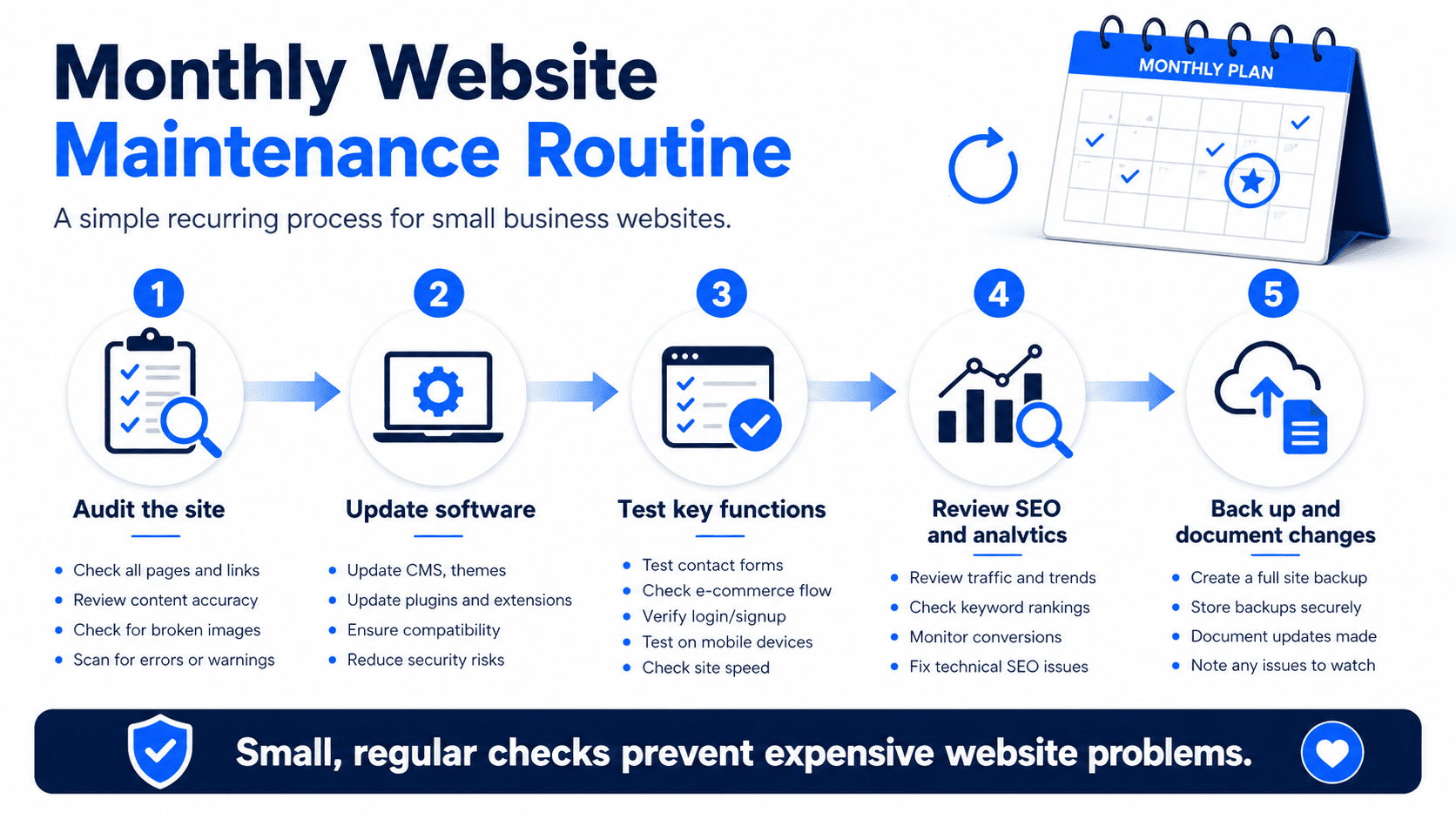
Each month, review your most important website functions.
Test your contact forms, phone links, WhatsApp buttons, booking links, and checkout or payment flow if relevant. Check your homepage, service pages, and contact page on mobile. Review website speed and fix obvious issues. Update plugins, themes, or software if your platform requires it. Back up your website before major updates.
You should also check for broken links, review recent enquiries, update any changed business information, and look at analytics to see how the website is performing.
A monthly review helps catch practical problems before they cost you leads.
Quarterly Website Maintenance Checklist
Every few months, do a deeper review.
Look at your website copy, service pages, pricing guidance, testimonials, blog content, local SEO pages, and conversion paths. Update outdated information, add new proof, refresh important pages, and improve internal links.
Review which pages are generating traffic and which pages are not performing well. Check whether your website still matches your current business goals.
Quarterly maintenance is where you improve the website, not just keep it alive.
Keeping a website alive is good. Making it more useful is better. Civilization marches on.
Annual Website Maintenance Checklist
Once a year, do a full website review.
Ask whether your website still reflects your brand, services, pricing, target customers, and business direction. Compare your website with competitors. Review your SEO performance. Check whether your design still feels current. Review your customer journey and conversion rate.
This is also a good time to decide whether your website needs a refresh, redesign, new pages, updated offers, improved SEO structure, or better lead generation features.
A website that worked last year may not be enough this year.
Businesses change. Customers change. Competitors improve. Your website should not be frozen in time like an online fossil.
Should Small Businesses Handle Website Maintenance Themselves?
Some small businesses can handle basic maintenance themselves, especially if the website is simple and built on an easy platform.
However, technical maintenance can become stressful if you are not familiar with website systems. Updating plugins, fixing errors, improving performance, handling backups, checking security, and troubleshooting broken pages can take time.
For many small business owners, the bigger issue is not whether they can learn it. It is whether they should spend time doing it.
If your time is better spent selling, serving customers, or running the business, it may make sense to use a managed website plan or website maintenance service.
This is where Website-as-a-Service can be useful. A monthly website plan can include hosting, maintenance, updates, and support, so the business owner does not need to manage the technical side.
Website Maintenance and Lead Generation
Website maintenance is directly connected to lead generation.
A website that is fast, updated, accurate, mobile-friendly, and easy to contact will usually perform better than a neglected website.
Maintenance helps protect the parts of your website that generate enquiries. Your forms need to work. Your CTAs need to be clear. Your pages need to load quickly. Your service information needs to be accurate. Your testimonials need to feel current. Your SEO pages need to stay useful.
A neglected website may still exist online, but existence is a very low standard.
Your website should support your sales process, not just occupy a domain name.
Final Thoughts
Website maintenance is not optional for small businesses that rely on their website for credibility, enquiries, bookings, or sales.
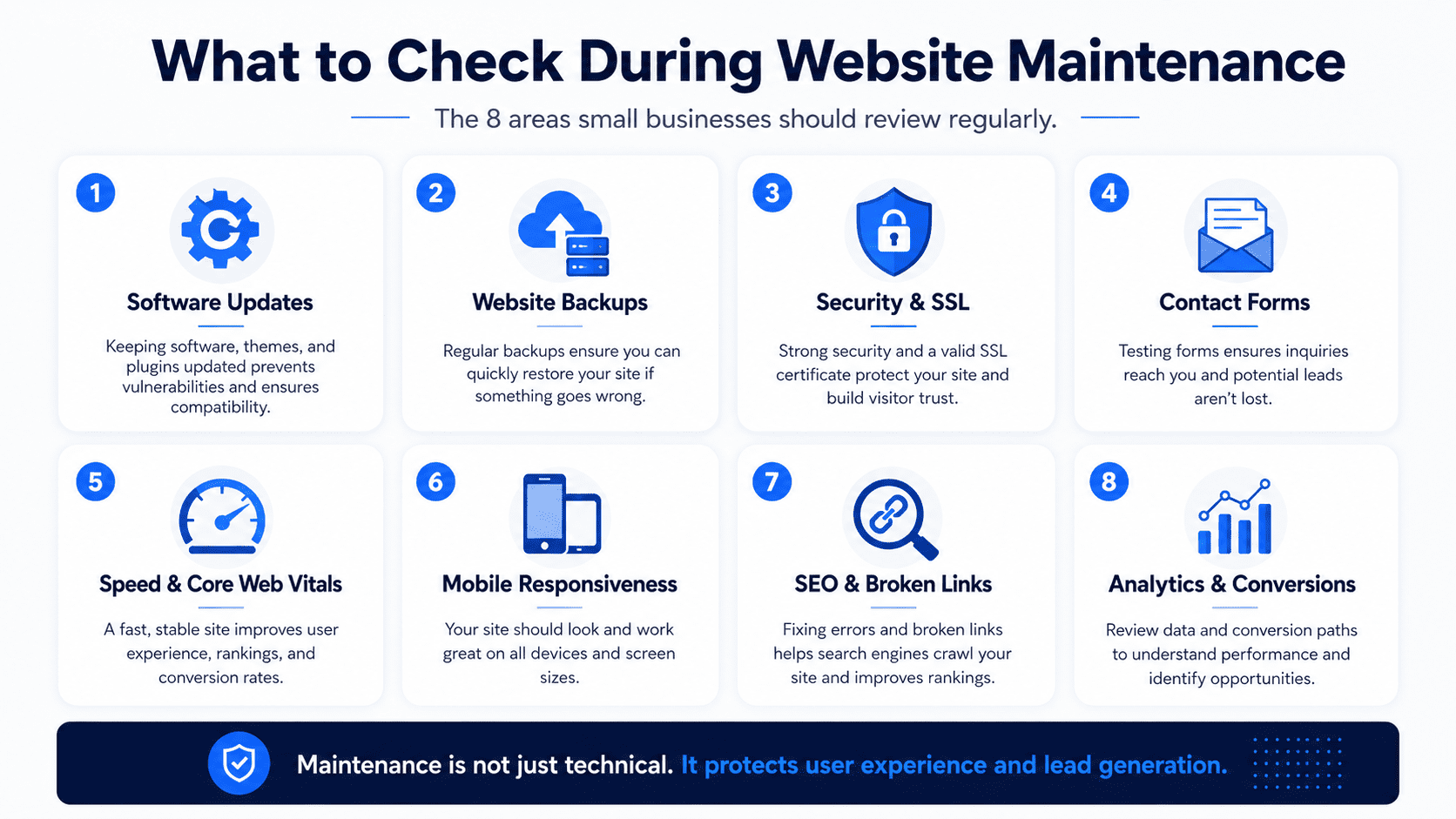
A small business website should be checked regularly for working forms, accurate business information, mobile usability, speed, security, backups, SEO, broken links, updated content, and clear conversion paths.
The goal is not to constantly rebuild your website.
The goal is to keep it healthy, accurate, trustworthy, and useful.
A well-maintained website helps customers understand your offer, trust your business, and take the next step. A neglected website can quietly cost you leads without making any dramatic announcement.
That is the annoying thing about website problems. They do not always shout.
Sometimes they just reduce enquiries while everyone pretends the website is “fine.”