A local service business website has one important job: to turn nearby visitors into real enquiries. It should help people understand what you offer, where you operate, why they should trust you, and how to contact you quickly. For local service businesses, the website is often the bridge between a customer searching online and a customer calling, booking, or requesting a quote.
The problem is that many local service business websites are designed like basic digital brochures. They may look acceptable, but they do not guide visitors toward action. They list services, show a few images, add a contact form, and hope people enquire. Hope, as usual, is not a conversion strategy.
The best website design for local service businesses is clear, mobile-friendly, fast, trustworthy, and built around lead generation.
This guide explains what a strong local service business website should include, how to structure each page, what design elements matter most, and how to turn more visitors into calls, bookings, WhatsApp messages, and quote requests.
What Is a Local Service Business Website?
A local service business website is a website created for a business that serves customers in a specific city, town, region, or service area.
Examples include:
- Plumbers
- Electricians
- Cleaning companies
- Aircon repair services
- Beauty salons
- Clinics
- Dentists
- Landscapers
- Pest control companies
- Renovation contractors
- Fitness studios
- Car workshops
- Accounting firms
- Legal firms
- Real estate agents
- Local consultants
- Home service providers
Unlike an e-commerce website, a local service website usually does not need to sell products directly online. Its main goal is to generate enquiries. That means the design must make it easy for visitors to:
- Understand the service
- Check if the business serves their area
- Trust the company
- Compare the offer
- Call, message, book, or request a quote
A good local service website does not just look nice. It helps people take action.
Why Website Design Matters for Local Service Businesses
Local customers often make decisions quickly.
Someone searching for “aircon repair near me,” “dentist in Kuala Lumpur,” or “plumber in Manchester” may compare several businesses within minutes. If your website is slow, unclear, outdated, or difficult to use on mobile, they may choose a competitor before you even know they visited.
Good website design helps local businesses:
- Build trust faster
- Explain services clearly
- Improve local SEO visibility
- Generate more calls and enquiries
- Support paid ads and local campaigns
- Make mobile contact easier
- Show reviews and proof
- Reduce customer hesitation
- Improve conversion rates
For local service businesses, design is not only about colors and layout. It is about creating a clear path from search to enquiry.
The Best Website Structure for Local Service Businesses
A strong local service business website should include the right pages. A simple structure could look like this:
- Homepage
- Services page
- Individual service pages
- Areas served or location pages
- About page
- Reviews or testimonials page
- Pricing or quote page
- FAQ page
- Blog or resources
- Contact page
Not every business needs all these pages immediately, but this structure gives your website room to grow. For a new local business, you can start with:
- Homepage
- Services
- About
- Contact
- FAQ
Then add dedicated service pages, location pages, reviews, and blog content over time.
Homepage Design for Local Service Businesses
Your homepage should quickly tell visitors what you do, where you operate, and how they can contact you. The homepage should not be vague. It should not open with “Welcome to Our Website,” because apparently some websites still enjoy wasting the most valuable section on the page.
A strong homepage hero section should include:
- Clear headline
- Service area
- Main benefit
- Primary call to action
- Secondary contact option
- Trust signal
- Relevant image
Weak Homepage Headline
“Professional Services You Can Trust.” This sounds safe, but it does not say what service you provide or where you provide it.
Strong Homepage Headline
“Reliable Aircon Repair Services in Kuala Lumpur and Selangor.” This is better because it tells visitors the service and location immediately.
Another Example
“Affordable Website Design for Local Businesses That Need More Enquiries.” This works because it explains the offer, audience, and result.
Recommended Homepage Sections
A local service business homepage should include:
- Hero section with clear service and location
- Trust indicators
- Main services overview
- Why choose us
- Service area section
- Reviews or testimonials
- Process section
- Pricing guidance or quote section
- FAQ section
- Final CTA
- Contact section
- Footer
This structure gives visitors the information they need without making them dig through the site like it is an archaeological site for basic contact details.
Hero Section: Make the First Five Seconds Count
The hero section is the first thing visitors see. It should answer:
- What do you do?
- Where do you serve?
- Who do you help?
- What should visitors do next?
For local service businesses, location clarity is important.
Examples:
- “Same-Day Plumbing Services in Petaling Jaya”
- “Professional House Cleaning in Singapore”
- “Family Dental Clinic in Subang Jaya”
- “Website Design for Small Businesses in Malaysia”
- “Emergency Electrical Repair in London”
A strong hero section should also include CTA buttons such as:
- Call Now
- Request a Free Quote
- Book an Appointment
- Send WhatsApp Message
- Check Availability
For mobile users, click-to-call and WhatsApp buttons are especially valuable.
Trust Indicators: Show Credibility Early
Local customers want to know whether your business is reliable. Trust indicators should appear near the top of the website, ideally below the hero section. Useful trust indicators include:
- Star ratings
- Number of customers served
- Years of experience
- Certifications
- Licenses
- Awards
- Client logos
- Review snippets
- Response time
- Service guarantees
Examples:
- “Rated 4.9 by local customers”
- “Trusted by 500+ homeowners”
- “10+ years serving Kuala Lumpur”
- “Licensed and insured technicians”
- “Same-day service available”
These details help reduce doubt quickly. Do not make customers scroll to the bottom of the page to discover whether you are trustworthy. The attention span economy is already tragic enough.
Services Section: Make Your Offers Easy to Understand
Your services section should clearly show what you provide. Avoid vague descriptions. Visitors should be able to identify the right service quickly. For example,
A cleaning company may list:
- House cleaning
- Office cleaning
- Deep cleaning
- Move-in cleaning
- Post-renovation cleaning
A website design business may list:
- Monthly website plans
- Custom website design
- Landing page design
- Website redesign
- SEO website setup
Each service should include a short description and a link to a dedicated service page.
Example Service Card
Website Redesign
Improve an outdated website with clearer messaging, better mobile design, stronger calls to action, and a structure built to generate more enquiries.
Button: View Website Redesign Service
This is better than simply listing “Website Redesign” and expecting visitors to understand the value through telepathy.
Individual Service Pages: Build Pages for Each Main Service
One of the biggest mistakes local service businesses make is putting all services on one page.
A single services page is useful, but each major service should have its own dedicated page.
Dedicated service pages help with:
- SEO
- Conversion
- Paid ad relevance
- Customer understanding
- Internal linking
- Better enquiry quality
A strong service page should include:
- Service-specific headline
- Location or service area
- Problem the customer has
- How the service solves it
- What is included
- Benefits
- Process
- Pricing guidance
- Reviews or proof
- FAQs
- CTA
Example Service Page Title
“Aircon Servicing in Petaling Jaya”
Example Service Page Sections
- Aircon servicing for homes and offices in Petaling Jaya
- Common signs your aircon needs servicing
- What is included in our service
- Why choose our technicians
- Pricing or quote guidance
- Customer reviews
- FAQs
- Book a service
This kind of structure helps both search engines and potential customers understand the page clearly.
Location and Service Area Pages
For local SEO, location pages can be very useful. If your business serves multiple cities, towns, or regions, you can create pages for each important area.
Examples:
- Cleaning Services in Petaling Jaya
- Cleaning Services in Subang Jaya
- Cleaning Services in Shah Alam
- Web Design Services in Kuala Lumpur
- Web Design Services in Singapore
- Plumbing Services in Manchester
However, location pages should not be lazy copy-paste pages with only the city name changed. Search engines and humans both dislike that, though humans usually express it with slightly more disappointment.
A good location page should include:
- Service offered in that area
- Local context
- Areas or neighborhoods covered
- Relevant testimonials if available
- FAQs for that location
- Contact options
- Clear CTA
Location pages should be genuinely useful, not thin pages created only to chase rankings.
Mobile-First Design: Essential for Local Businesses
Most local service searches happen on mobile devices. A visitor may be searching while standing outside, sitting in a car, comparing options at home, or urgently needing help. If your website is difficult to use on mobile, you may lose the enquiry.
A mobile-friendly local service website should include:
- Fast loading pages
- Large readable text
- Tap-friendly buttons
- Sticky call or WhatsApp button
- Simple navigation
- Short contact forms
- Clear service sections
- No broken layouts
- No tiny menu links
- No intrusive popups
Mobile users should be able to contact you within a few taps. Useful mobile CTA buttons include:
- Call Now
- WhatsApp Us
- Get Quote
- Book Appointment
For local service businesses, mobile design is not optional. It is where many enquiries happen.
Fast Loading Speed
A slow local service website can lose visitors before they see your offer.
Speed matters because customers do not want to wait, especially when they are comparing businesses.
Common causes of slow websites include:
- Large image files
- Too many plugins
- Heavy animations
- Poor hosting
- Unoptimized videos
- Too many third-party scripts
- Bloated page builders
- No caching
To improve speed:
- Compress images
- Use WebP images where possible
- Remove unnecessary scripts
- Keep design clean
- Use reliable hosting
- Avoid oversized videos
- Test mobile performance
- Use lightweight sections
A fast website feels more professional and helps visitors reach your CTA faster.
Clear Calls to Action
A local service website needs strong CTAs throughout the page. Do not rely on one contact button hidden in the navigation menu.
Good CTA examples include:
- Request a Free Quote
- Call Now
- Book an Appointment
- Send WhatsApp Message
- Get a Website Plan
- Schedule a Site Visit
- Check Availability
- Ask for Pricing
CTA buttons should appear in:
- Header
- Hero section
- Service sections
- Pricing section
- FAQ section
- Footer
- Mobile sticky bar
Your CTA should match how customers prefer to contact you. For urgent services, “Call Now” works well.
For appointment-based services, “Book an Appointment” works better.
And for quote-based services, “Request a Free Quote” is clearer.
Reviews and Testimonials
Reviews are one of the most powerful sections for local service businesses. Local customers often compare businesses before contacting one. Reviews help them feel safer choosing you.
Your website should include:
- Short review snippets
- Customer names, where appropriate
- Star rating if available
- Service-specific testimonials
- Google review link
- Before-and-after examples if relevant
A weak testimonial says: “Great service.”
A stronger testimonial says: “The team responded quickly, explained the repair clearly, and fixed our aircon the same day. Booking was easy and the price was transparent.”
Specific testimonials are more believable. Place reviews near key decision points, not only on one separate page.
Before-and-After or Portfolio Section
Some local service businesses benefit from visual proof. Examples include:
- Renovation
- Landscaping
- Cleaning
- Beauty services
- Fitness transformation
- Web design
- Interior design
- Repair work
- Photography
- Event services
A portfolio or before-and-after section helps visitors see your quality. For a website design business, this could include screenshots of completed websites. For a cleaning business, it could include before-and-after photos. And for a renovation business, it could show completed projects.
Visual proof helps customers believe your claims.
Pricing or Quote Guidance
Many local service businesses avoid showing prices. That can be understandable because pricing may depend on scope, location, property size, urgency, or service type. But giving no pricing guidance can create friction.
Visitors may hesitate because they do not know whether your service fits their budget. You can provide pricing guidance without listing every exact price.
Examples:
- “Services start from RM150”
- “Managed Website: see current pricing and setup fees”
- “Free quote available after site assessment”
- “Pricing depends on property size and service requirements”
- “Call us for same-day service pricing”
Pricing guidance improves transparency and can generate better-quality enquiries.
FAQ Section: Remove Customer Doubt
A FAQ section helps answer common questions before customers contact you. For local service businesses, useful FAQs include:
- What areas do you serve?
- How quickly can you respond?
- How much does the service cost?
- Do you offer emergency service?
- Are you licensed or insured?
- How do I book?
- What payment methods do you accept?
- Do you provide a warranty or guarantee?
- What should I prepare before the appointment?
- Can I reschedule?
FAQs reduce hesitation and help customers take action with more confidence. They can also support SEO because many searches are question-based.
Contact Page: Keep It Simple
Your contact page should not feel like paperwork. People are trying to enquire, not apply for a government permit. A strong contact page should include:
- Short intro
- Simple form
- Phone number
- WhatsApp link
- Email address
- Business address if relevant
- Google Map
- Operating hours
- Service areas
- Response time
- Booking link if available
A simple enquiry form should ask for:
- Name
- Phone or email
- Service needed
- Message
If you need more details, collect them after the first contact. The goal is to start a conversation.
Header Design for Local Service Websites
The header should be simple and useful.
A good header may include:
- Logo
- Main navigation
- Phone number
- CTA button
- Mobile menu
- Sticky contact button
Recommended menu items:
- Home
- Services
- Areas Served
- Reviews
- About
- Contact
For appointment-based businesses, the header CTA could be: “Book Appointment”
For urgent services: “Call Now”
And for quote-based services: “Request Quote”
The header should help visitors move quickly, not overwhelm them with too many menu items.
Footer Design for Local Service Websites
The footer is often where visitors look for practical details. A strong footer should include:
- Business name
- Short description
- Main services
- Service areas
- Phone number
- Email address
- Address if relevant
- Opening hours
- Social links
- Legal links
- CTA
- Copyright notice
For local SEO, it helps to include consistent business information in the footer. Make sure your business name, address, and phone number are accurate.
Local SEO Design Elements
Website design and local SEO should work together. A local service website should include:
- Location keywords in page titles
- Service area content
- Dedicated service pages
- Dedicated location pages
- Google Maps embed
- Clear contact details
- Local reviews
- Internal links
- Schema markup where appropriate
- Fast mobile performance
- Helpful FAQ sections
- Blog content around local customer questions
Example local SEO page titles:
- “Website Design for Small Businesses in Malaysia”
- “Aircon Repair Services in Petaling Jaya”
- “House Cleaning Services in Singapore”
- “Dental Clinic in Subang Jaya”
Local SEO helps your website appear when nearby customers search for your services.
Blog Content for Local Service Businesses
A blog can help local service businesses attract search traffic and answer customer questions.
Good blog topics include:
- How much does [service] cost in [location]?
- How to choose the right [service provider]
- Signs you need [service]
- [Service] checklist for homeowners
- [Service] vs [alternative service]
- Best time to book [service]
- Common mistakes before hiring a [service provider]
- What to expect during a [service appointment]
For a website design business, blog topics could include:
- How Much Does a Small Business Website Cost?
- Landing Page vs Website
- Website Redesign Checklist
- Why Small Business Websites Do Not Generate Leads
- Best Website Structure for Service Businesses
Blog posts should link to service pages so readers can move from learning to enquiring.
Best Design Style for Local Service Businesses
The best design style depends on the industry, but most local service websites should feel:
- Clear
- Trustworthy
- Professional
- Easy to navigate
- Friendly
- Fast
- Mobile-first
- Conversion-focused
Avoid overcomplicated designs that distract from the main goal. For local service businesses, function matters more than fancy effects.
Use:
- Clear typography
- Strong contrast
- Clean spacing
- Real photos where possible
- Simple icons
- Visible CTAs
- Short sections
- Trust proof
- Local details
A website can look modern without becoming a museum exhibit for animations nobody asked for.
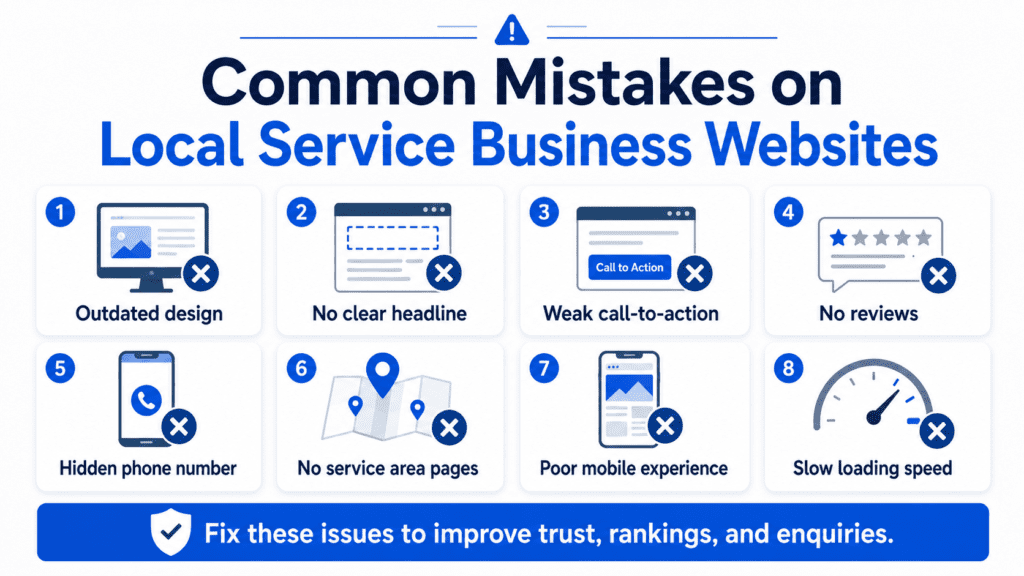
Common Website Design Mistakes Local Businesses Make
Avoid these mistakes:
- Vague homepage headline
- No visible phone number
- Weak or hidden CTA
- No service area information
- No reviews or proof
- Slow mobile loading
- Long contact forms
- All services on one page only
- No local SEO structure
- No dedicated service pages
- Outdated images
- Confusing navigation
- No pricing guidance
- No FAQ section
- Contact details buried in the footer only
- No conversion tracking
Fixing these issues can improve enquiries without needing a dramatic redesign.
Example Homepage Structure for a Local Service Business
Here is a simple homepage structure you can use:
- Hero section: Clear service, location, benefit, and CTA.
- Trust indicators: Reviews, years of experience, certifications, or customers served.
- Services overview: Main services with short descriptions and links.
- Why choose us: Specific reasons customers should choose your business.
- Service area: Cities, towns, or regions you cover.
- Process: How booking or enquiry works.
- Reviews: Customer testimonials and proof.
- Pricing guidance: Starting prices or quote explanation.
- FAQs: Common customer questions.
- Final CTA: Clear next step.
- Contact section: Form, phone, WhatsApp, email, map, and hours.
This structure works because it matches how local customers make decisions.
What a High-Converting Local Service Website Needs
A high-converting local service website should include:
- Clear headline
- Location-based messaging
- Strong CTAs
- Click-to-call button
- WhatsApp or messaging option
- Service pages
- Local SEO structure
- Reviews and testimonials
- Pricing or quote guidance
- Fast loading speed
- Mobile-first design
- Simple contact forms
- FAQs
- Service area details
- Trust indicators
- Conversion tracking
These elements work together to turn visitors into enquiries.
Final Thoughts
The best website design for local service businesses is not about having the most stylish website. It is about having the clearest and most useful website. Your website should help nearby customers quickly understand what you offer, where you operate, why they should trust you, and how to contact you.
A strong local service website needs clear messaging, mobile-first design, fast loading speed, service pages, local SEO, reviews, pricing guidance, FAQs, and strong calls to action. When these pieces work together, your website becomes more than an online brochure.
It becomes a lead generation tool that helps your local business turn searches into calls, messages, bookings, and quote requests.