You search for website design in Malaysia.
One provider quotes RM800.
Another quotes RM3,500.
Another quotes RM8,000.
Naturally, the RM800 option looks attractive.
Why pay more if all you need is a business website?
Sometimes, the cheaper option is genuinely the right choice.
A simple business with straightforward requirements may not need a large custom website project. A well-configured template can be perfectly adequate.
The problem is not cheap website design itself.
The problem is buying a low-priced website without understanding what has been left out.
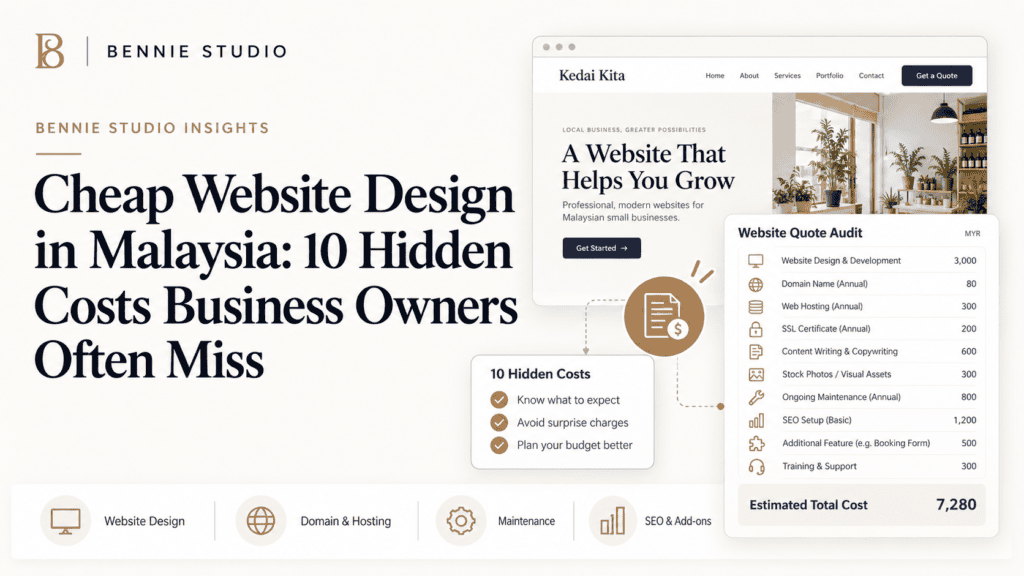
A website that costs RM800 to launch can eventually cost much more once you add hosting, maintenance, copywriting, SEO, extra pages, fixes, redesign work and technical support.
So before asking:
“Who can build my website cheapest?”
ask:
“What will I need to pay for after the website is built?”
Here are ten hidden costs Malaysian business owners should check before accepting a cheap website quotation.
Cheap Does Not Automatically Mean Bad
First, an important distinction.
A lower-priced website can make sense when:
- your business is new
- you are validating an idea
- you have a limited budget
- the website is simple
- your content is ready
- you do not need advanced functionality
- you understand exactly what is included
For example, if you need a straightforward five-page website with:
- Home
- About
- Services
- FAQ
- Contact
a template-based solution may be perfectly suitable.
You do not need to spend RM15,000 simply because someone used the phrase “digital transformation.”
Budget should match business need.
The danger appears when a cheap quotation looks like a complete website solution but actually includes only the bare build.
That is when the hidden costs begin.
Hidden Cost #1: Hosting
A quotation may say:
Website Design – RM999
But where will the website be hosted?
Some providers include hosting for the first year.
Others do not.
You may later need to purchase:
- shared hosting
- managed hosting
- cloud hosting
- server support
Ask:
Is hosting included?
For how long?
What is the renewal price?
Who manages it?
A cheap first-year package can become less attractive if renewal costs are unusually high or the hosting is too weak for the website.
The bigger issue is not simply the fee.
Poor hosting can also affect:
- website speed
- reliability
- backups
- technical support
Saving RM20 or RM30 per month is not especially useful if your business website becomes painfully slow whenever several people visit at once.
Hidden Cost #2: Domain Registration
Your website needs a domain.
For example:
yourbusiness.com
or:
yourbusiness.com.my
Some website packages include domain registration.
Others charge separately.
The actual registration fee is usually not the biggest issue.
Ownership is.
Ask:
Whose account is the domain registered under?
Will I receive the login details?
Can I renew it myself?
Your business should have clear control over its domain.
If the developer disappears, changes career or becomes impossible to contact, you should still be able to manage your own website address.
A business domain should not become a hostage simply because someone saved RM100 during the original project.
Hidden Cost #3: Copywriting
This is one of the biggest omissions in low-cost website packages.
The quotation may include:
Five-page professional website.
But then the provider asks:
Please send us all content.
You now need to write:
- homepage headline
- company introduction
- service descriptions
- About page
- FAQs
- calls to action
- contact information
Many business owners underestimate how difficult this can be.
You know your business.
That does not automatically mean writing persuasive website copy is easy.
A website needs to explain:
What do you do?
Who is it for?
Why should someone choose you?
What should they do next?
If copywriting is not included, you may later need to hire someone separately.
That should be included in your real budget.
Hidden Cost #4: Extra Pages
Low-priced packages often have strict page limits.
For example:
Up to five pages
That is fine if you genuinely need five pages.
But suppose you later realise each important service deserves its own page.
Your business might offer:
- Accounting
- Payroll
- Tax
- Company Secretarial
- Advisory
If all five services are compressed into one general Services page, the website may be less useful for both visitors and SEO.
You may then need to purchase extra pages.
Ask upfront:
How much does each additional page cost?
Also ask what counts as a page.
A blog archive, product page or location page may be treated differently depending on the provider.
The cheapest quotation can quickly stop being the cheapest after six additional pages are added.
Hidden Cost #5: Mobile Optimisation
Most modern providers include responsive design.
But you should still confirm it.
Do not accept:
Yes, it works on mobile.
as the end of the conversation.
There is a difference between:
The page technically shrinks onto a phone
and:
The page has been properly designed for mobile visitors.
Check:
- text size
- button size
- navigation
- forms
- image loading
- WhatsApp links
- phone-call buttons
- tables
- spacing
A website can look excellent on a laptop and be frustrating on a phone.
If a large share of your customers discover you through Google, social media or WhatsApp, mobile usability is not a bonus feature.
It is part of the website.
Hidden Cost #6: SEO
A cheap website package may advertise:
SEO included.
This phrase deserves follow-up questions.
Ask:
What exactly is included?
Basic SEO setup might include:
- page titles
- meta descriptions
- sitemap
- heading structure
- search-engine indexing
That is useful.
But it is not the same as an ongoing SEO strategy involving:
- keyword research
- competitor research
- content planning
- service pages
- local SEO
- blog content
- link building
- ongoing optimisation
Do not assume that paying for a website means customers will automatically start finding you on Google.
A website is the platform.
SEO is an ongoing marketing activity.
If organic search matters to your business, budget accordingly.
Hidden Cost #7: Maintenance
Who looks after the website after launch?
Many low-cost website packages end when the website goes live.
After that, you may be responsible for:
- software updates
- backups
- security
- hosting
- technical problems
- plugin conflicts
That may be fine if you are comfortable managing the website yourself.
If not, you may need a maintenance plan.
For a business website, ongoing maintenance can become a significant part of the total ownership cost over several years.
So ask:
Is maintenance included?
For how long?
What does it cover?
A RM1,000 website plus three years of separate maintenance may have a very different total cost from what the initial quotation suggests.
Hidden Cost #8: Content Changes
Your website will not remain unchanged forever.
You may need to update:
- staff
- pricing
- services
- contact details
- promotions
- project photos
- testimonials
Some website packages give you full access to edit content yourself.
Others require the provider to make every change.
If every small update is chargeable, those costs can accumulate.
Ask:
Can I edit the website myself?
Will training be provided?
How much do future changes cost?
For businesses that change frequently, ongoing managed support may make more sense than paying separately every time something changes.
Hidden Cost #9: Premium Plugins and Software
Websites often depend on third-party tools.
Examples include:
- page builders
- booking systems
- form plugins
- security tools
- backup software
- multilingual plugins
- eCommerce extensions
A developer may include these licences during the first year.
But what happens afterward?
Ask:
Are premium licences included?
Who pays for renewals?
Will the website still work if the licence expires?
Some tools continue working but stop receiving updates.
Others lose functionality.
If your business depends on a premium booking or payment system, renewal costs are worth understanding before launch.
Hidden Cost #10: Rebuilding a Website That Was Built Too Cheaply
This can be the most expensive hidden cost of all.
Imagine you buy a RM1,000 website.
Six months later you discover:
- it is difficult to update
- mobile performance is poor
- the structure cannot support SEO
- adding pages is difficult
- the platform cannot support new functionality
- the developer is no longer available
You then spend RM6,000 rebuilding it.
Your cheap website effectively cost RM7,000.
Plus the lost time.
Plus the frustration.
That does not mean every RM1,000 website will fail.
It means the website should be appropriate for where the business is going.
If you already know that you will soon need:
- online booking
- more locations
- dozens of service pages
- eCommerce
- multilingual content
- advanced integrations
build with those requirements in mind.
Saving money by building the wrong foundation is usually temporary.
Cheap Website vs Affordable Website
These terms should not mean the same thing.
A cheap website focuses primarily on minimising the initial price.
An affordable website focuses on giving the business what it needs at a sensible cost.
That distinction matters.
For example:
Cheap approach
RM800 website
But:
- no copywriting
- no maintenance
- no SEO setup
- no analytics
- limited support
- extra page charges
Affordable approach
RM3,000 website
Including:
- clear page structure
- responsive design
- basic SEO
- forms
- analytics
- support
- usable backend
The second option costs more upfront.
But it may provide much better value.
Affordable should mean:
Right solution for the budget.
Not:
Lowest number on the quotation.
Questions to Ask Before Buying a Cheap Website
Before signing, ask these questions.
- How many pages are included?
- Is the design custom or template-based?
- Is copywriting included?
- Is mobile optimisation included?
- Is basic SEO included?
- Is hosting included?
- Is the domain included?
- Who owns the domain?
- Are premium plugins required?
- Are plugin renewals included?
- Is maintenance included?
- Can I edit the website myself?
- How much do future changes cost?
- Is analytics included?
- Is post-launch support included?
- What happens if the provider stops supporting the website?
You do not need a fifty-page legal contract.
You do need enough clarity to understand the true cost.
When Should You Choose the Cheapest Option?
A low-cost website can be sensible when you are:
Testing a New Business
You may not yet know whether the idea will work.
Keep initial investment reasonable.
Building a Temporary Site
Perhaps you need a simple presence before a larger project.
Launching One Simple Offer
A basic landing page may be enough.
Handling Most Things Yourself
If you can manage content, hosting and maintenance internally, you may not need a comprehensive package.
The important part is making the choice deliberately.
Do not buy a basic website expecting full-service support.
When Should You Spend More?
Consider a larger investment when the website is important to:
- generating enquiries
- supporting advertising
- building credibility
- ranking on Google
- selling online
- attracting high-value customers
- supporting multiple locations
If one new customer could be worth RM10,000 to your business, optimising purely for the lowest website price may be the wrong objective.
The website should be evaluated based on business impact.
The Better Question: What Is the Total Cost?
Suppose Option A costs:
RM1,200 upfront
but requires:
- RM500 yearly hosting
- RM3,600 yearly maintenance
- RM1,500 extra pages
- RM1,000 copywriting
The real cost is already much higher.
Option B may cost:
RM5,000 upfront
but already includes several of those items.
That does not automatically make Option B better.
But now you are comparing properly.
Use:
Initial cost + ongoing cost + likely future cost
rather than:
Initial quotation only.
Frequently Asked Questions
How much does cheap website design cost in Malaysia?
Low-cost website packages can range from several hundred ringgit upward, depending on pages, platform and provider.
The more important question is what the quoted price includes.
Is a cheap website bad for SEO?
Not necessarily.
A lower-cost website can still have good technical foundations.
Problems appear when the website has poor structure, weak content, slow performance or limited ability to expand.
Can I start cheap and upgrade later?
Yes.
This can be a sensible strategy for a new business.
Just make sure the platform and ownership arrangement allow you to expand or migrate later.
Should I use a website template?
Templates can be excellent for budget-conscious projects.
The quality depends on how well the template is adapted to your content, brand and customer journey.
Is WordPress expensive to maintain?
It depends on the setup.
WordPress itself can be inexpensive, but hosting, premium plugins, backups, maintenance and support may create ongoing costs.
What should I prioritise if my budget is small?
Prioritise:
- clear messaging
- mobile usability
- important service pages
- simple contact options
- reliable hosting
- ownership and access
You can add more advanced features later.
Buy the Website Your Business Actually Needs
There is nothing wrong with wanting an affordable website.
Businesses should control costs.
But the cheapest website is only a good deal if it solves the problem you bought it to solve.
Before choosing based on price, look at:
what is included
what is missing
what costs extra
what happens after launch
whether the website can grow with the business
A RM1,000 website that does everything you need is excellent value.
A RM1,000 website that needs replacing six months later is expensive.
At Bennie Studio, website projects are scoped around the business goal rather than simply competing for the lowest possible build price. The aim is to give businesses a clear understanding of what they are paying for and what ongoing costs they should expect.
If your budget is limited, the objective should not be to buy the biggest website.
It should be to build the right website first and expand intelligently when the business grows.
Explore Website Design Options →
Comparing low-cost website packages and unsure what is actually included?
Get a Website Project Review →
Next steps: view website design services, compare Malaysia website pricing, or browse website examples. If you want a tailored recommendation, generate a free website preview.