If you’re new to WordPress, it’s completely normal to feel unsure about where to start. With so many features, settings, and options available, the learning curve can look intimidating at first. The good news? WordPress becomes surprisingly easy once you understand the basics, and this guide walks you through every essential step.
Before we dive into the full tutorial, here’s a quick overview of what you’ll learn:
- How to install WordPress using the easiest beginner-approved method
- How to navigate the dashboard confidently
- Choose and customize a theme that fits your style
- How to use plugins to expand your site’s features
- How to follow a step-by-step roadmap to learn WordPress fast
- Avoid the most common mistakes beginners make
Whether you’re building a blog or launching a business website, this guide will help. It also supports anyone exploring the world of web design. You’ll learn WordPress efficiently without feeling overwhelmed.
Why WordPress Is Worth Learning
WordPress isn’t just another website builder — it’s the world’s most widely used content management system, powering more than 43% of all websites. From personal blogs and online stores to corporate sites, portfolios, and membership platforms, it’s versatile enough to handle just about anything.
Moreover, learning WordPress gives you a real advantage because it’s beginner-friendly while still offering the depth and flexibility developers need. You can build almost any kind of website without writing a single line of code, and you’ll be supported by a massive global community of designers, developers, and content creators.
Beyond that, it’s also a skill that stays highly relevant in today’s digital world. Freelancers, entrepreneurs, marketers, and small business owners all depend on WordPress to build and grow their online presence. Ultimately, when you understand how the platform works, you can create better sites, work more efficiently, and stay competitive in an increasingly digital economy.
Top Reasons to Learn WordPress (and What They Mean for You)
Here’s a clearer breakdown of why WordPress is such a valuable skill, especially if you want to launch or manage websites without relying on a developer.
1. It’s Budget-Friendly and Accessible
WordPress itself is free, and you don’t need costly tools or advanced skills to get started. Hosting plans are budget-friendly, and many providers like Bluehost offer a free domain for the first year, simple one-click WordPress installation, and access to thousands of themes and plugins. With that setup, you can launch a full website on a modest budget and keep expanding it with new features whenever you need, all without hiring a developer.
2. It Works for Any Type of Website
Whether you’re building a blog, portfolio, personal brand site, business homepage, landing page, or even a full online store, WordPress can do it all. Its flexibility makes it a great fit for creators, coaches, eCommerce sellers, agencies, freelancers, and local businesses alike. You’re never boxed into a single type of site. Your website can evolve as your goals and business grow.
3. Thousands of Themes, Plugins & Support Resources
One of WordPress’s biggest advantages is the massive ecosystem behind it. You have thousands of free and premium themes to shape your site’s design, plus plugins that can add virtually any feature you can think of. SEO tools, security enhancements, eCommerce systems, forms, booking tools, and plenty more. On top of that, there’s a huge global community offering tutorials, courses, forums, and documentation. All of this means you can build and customize your entire website without needing to write a single line of code, and you’ll never be short on guidance when you need it.
Before You Start Learning WordPress: The Essential Beginner’s Checklist
If you’re preparing to learn WordPress for the first time, it’s easy to feel overwhelmed by all the moving parts, hosting, domains, dashboards, themes, plugins, and more. The truth is, getting started doesn’t have to be complicated. With a clear checklist in hand, you can set up your foundation quickly and confidently, even if you’ve never built a website before.
Below is a simplified, beginner-friendly checklist to help you prepare for your WordPress learning journey and build your first website with ease.
1. Choose Your Domain Name and Register It
Your domain name is your online identity — it’s how people find you and how your brand is remembered. Before anything else, decide on a name that reflects your purpose, whether it’s a personal brand, a blog, or a business.

Once you’ve chosen your name, register it with a domain registrar. This is the service that manages your domain ownership and renewals. Popular registrars make the process smooth and often provide helpful add-ons like privacy protection and DNS management.
2. Select a Reliable Web Hosting Provider
Your hosting plays a major role in how fast and stable your WordPress website will be. Even though WordPress is beginner-friendly, the quality of your hosting determines your overall experience — from loading speed to security to how easy it is to install WordPress.
Most reputable hosting providers offer one-click WordPress installation, making setup effortless.
A strong hosting provider should offer:
- Fast loading performance
- Built-in security tools
- Easy WordPress installation
- Helpful customer support
- Room to scale as your site grows
For example, many beginners choose Bluehost because it provides optimized WordPress hosting, a free domain for the first year, built-in caching, and 24/7 support, perfect for users who want a smooth start.
3. Install WordPress on Your Hosting Account
Once your hosting and domain are ready, the next step is installing WordPress. Fortunately, this process usually takes just a few minutes with guided setup tools.
After that, you’ll receive login details for your new WordPress dashboard — the heart of your website. From here, your learning journey truly begins.
4. Get Comfortable With the WordPress Dashboard
The WordPress dashboard is your website’s command center. It’s where you’ll create content, manage plugins, customize your design, upload images, and more.
Key areas to explore include:
- Posts – for blog content
- Pages – for static pages like Home, About, or Services
- Appearance – for themes, menus, and design customization
- Plugins – to add features
- Media – to upload images, videos, and files
- Settings – to configure your site preferences
Take a few minutes to click around and familiarize yourself with the layout. A little early exploration makes the rest of your learning journey much smoother.
5. Pick Your First Theme (Free or Premium)
Your WordPress theme controls the design, layout, and overall feel of your website. With thousands of free and premium themes available, you can choose a look that matches your style or niche.
- Free themes are perfect for beginners and simple sites.
- Premium themes often come with more flexibility, advanced features, and dedicated support.
Whether you’re building a blog, business site, or online store, there’s a theme for every purpose.
6. Install Essential WordPress Plugins
Plugins are a big part of what makes WordPress so powerful. They work like apps that add new features to your site—no coding required. For beginners especially, the most valuable types of plugins usually include SEO tools, security and malware protection, contact form builders, image optimization, caching and speed boosters, and backup solutions. To get started, installing them is simple: search for the plugin you want, hit “Install,” activate it, and the new feature is ready to use right away.
7. Save Helpful Learning Resources
Before you dive into building your first pages, it’s helpful to gather a few reliable learning resources. Having solid guidance nearby makes everything easier when you get stuck and speeds up your learning overall. Some great places to start include step-by-step video tutorials, YouTube channels focused on WordPress, the official WordPress.org documentation, online communities and support forums, and both free and paid courses. Keeping these resources bookmarked helps you follow best practices and avoid common beginner mistakes.
Step-by-Step How to Learn WordPress for Total Beginners
Starting your WordPress journey is exciting, but it can also feel confusing when you don’t know what to learn first. That’s why having a simple, structured roadmap makes all the difference. This beginner-friendly guide walks you through each stage in the right order — helping you build momentum, avoid overwhelm, and gain the confidence to create a fully functional website from scratch.
Whether you’re launching a blog, building a business site, or exploring web design for the first time, this step-by-step approach will guide you every step of the way.
Step 1: Install WordPress and Get to Know the Dashboard
Your WordPress journey starts with installing the platform through your hosting provider. Most hosts offer easy one-click installation, so getting set up is fast and beginner-friendly. Once everything is installed, take a little time to explore the dashboard. This is your main control center—the place where you’ll create blog posts, update pages, customize your design, install plugins, upload media, manage comments, and adjust important settings. Getting comfortable with the dashboard early on makes the entire experience feel much less intimidating and helps you learn more quickly.
Step 2: Learn the Basics Through Tutorials and Video Lessons
Before diving into customization, it’s worth taking a little time to get familiar with the basics. Start with simple tasks like creating your first post, adding essential pages such as Home, About, or Contact, uploading images and media, and editing your site’s menus. There are plenty of beginner-friendly resources to help you along the way—short YouTube tutorials, official WordPress.org guides, free step-by-step videos, and more in-depth courses. Pick the learning style that suits you best, whether you prefer watching, reading, or following structured lessons.
Step 3: Customize Your Website With Themes
Once you’re comfortable with the basics, you can start shaping how your website looks. WordPress themes control everything from layout and colors to fonts and overall design. Begin by trying out a few free themes—they’re great for getting familiar with how things work. Later, as your site grows or you want a more polished, professional feel, you can look into premium themes that offer more customization, ready-made templates, faster performance, and dedicated support. With the right theme, you can create a clean, professional-looking website without ever touching a line of code.
Step 4: Install Plugins to Add Features and Functionality
After you’ve set up your site’s design, the next step is adding the features you need—and that’s where plugins come in. They function like apps for your website, giving you extra tools and capabilities without any coding. For starters, a few essentials include SEO plugins to boost visibility, security tools to protect your site, form builders for contact pages, backup plugins for safety, and caching tools to help your site load faster. With that in mind, add plugins only as you need them so your site stays light, fast, and easy to maintain.
Step 5: Use Page Builders to Create Beautiful, Custom Pages
If you prefer designing visually rather than relying on the default WordPress editor, page builders can make a huge difference. For example, tools like Elementor, Divi, and Beaver Builder let you create beautiful pages using simple drag-and-drop elements. With these tools, you can build custom layouts, add animations, create multi-column sections, design landing pages, and tweak almost every part of your site visually. Ultimately, it’s an ideal solution for beginners who want polished, professional designs without touching any code.
Step 6: Practice by Creating and Publishing Your First Content
Now that the foundation is ready, it’s time to start creating. Publish your first content — whether it’s a blog post, a service page, a product listing, or a portfolio entry.
This is where everything starts to click. The more you practice, the more natural WordPress becomes. Content creation also helps you understand how layouts, images, SEO, and formatting work together.
Step 7: Explore Advanced Features at Your Own Pace
Once you’ve got the fundamentals down, you can start exploring more advanced features at your own pace. WordPress is built to scale with you, so there’s plenty of room to grow. You can dive into premium plugins for marketing and automation, advanced SEO tools, custom templates and blocks, membership systems, eCommerce setups, third-party integrations, and performance optimization techniques. There’s no need to rush—take your time. Learning gradually helps you build a solid, sustainable foundation and makes WordPress even more powerful as you go.
What Are the Most Effective Ways to Learn WordPress? (5 Proven Paths for Beginners)
Learning WordPress is much easier when you follow a clear, organized path instead of trying to figure everything out on your own. Whether you’re completely new or looking to sharpen your skills, the right learning approach can speed up your progress and help you build professional-quality websites with confidence.
Below are five of the most effective ways to learn WordPress — from guided video lessons to community support, hands-on workshops, and expert blogs. Choose the paths that fit your learning style and combine them for the best results.
1. Learn Through the Bluehost WordPress Academy
One of the easiest ways for beginners to learn WordPress is through the Bluehost WordPress Academy. It’s a dedicated learning platform designed to guide you step by step, using clear lessons, short tutorials, and practical examples you can follow—even if you’ve never built a website before.
Key Features of the Bluehost WordPress Academy
Step-by-step tutorials: The Academy breaks down essential WordPress tasks—like installing themes, managing plugins, and customizing your site—into simple, beginner-friendly lessons. Everything is explained clearly so you never feel overwhelmed.
Beginner-friendly approach: Every tutorial is created with non-technical users in mind. Whether you’re starting a blog, launching a business, or building your first website, the lessons stay practical, straightforward, and easy to apply.
Wide range of topics: You can learn everything from the basics to more advanced subjects like SEO, WooCommerce, security practices, and performance tips.
Benefits of Using the Bluehost WordPress Academy
- Completely free to access
- A structured, easy-to-follow learning path
- Perfect for Bluehost users who want guidance tailored to their hosting tools
- Hands-on practice you can apply directly to your own site
How to Get Started
Sign up for free with your email, then dive into all 14 expert lessons that cover everything from the basics to more advanced techniques. In addition, you can join the learning community to ask questions, share ideas, and connect with other WordPress users. As you progress, you’ll also earn certificates you can display on your resume, website, or LinkedIn profile. If you’re hosted on Bluehost, this academy provides one of the most straightforward and supportive ways to build your WordPress skills from the ground up.
2. Study from the Official WordPress Documentation
If you like learning through written guides or want to understand how WordPress works behind the scenes, the official WordPress documentation is one of the best resources you can use. It’s detailed, accurate, and updated regularly, making it a trustworthy place to learn at any level.
WordPress Codex
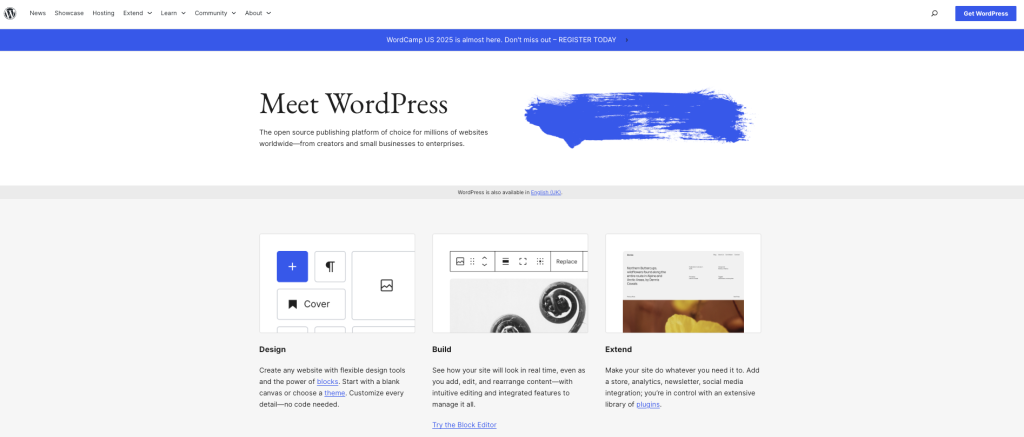
The WordPress Codex is a complete online manual that walks you through everything from the basics to more technical topics. Inside, you’ll find guidance on installing and configuring WordPress, understanding how themes and templates work, managing core settings, and even customizing your site with functions, hooks, and templates. Overall, it’s easy enough for beginners to follow, yet rich with technical detail for anyone who wants to dig deeper into how WordPress really works.
WordPress Developer Resources
If you want to go beyond the basics and understand WordPress on a more professional level, the Developer Resources section is incredibly useful. It offers detailed code references for classes, methods, and functions, along with handbooks that cover the REST API, the Block Editor (Gutenberg), plugin development, and theme development. You’ll also find best practices for building and customizing WordPress in more advanced ways. Whether you’re considering a career as a WordPress developer or just want to understand what’s happening behind the scenes, this resource is essential.
3. Join WordPress Communities and Forums
One of the fastest ways to improve your skills is to learn from real people who use WordPress every day. Communities give you direct access to experienced users, developers, designers, and beginners who are facing the same challenges as you.
Where to Connect
- WordPress.org Support Forums: The official forums are filled with questions and solutions from users around the world. You’ll find discussions on themes, plugin conflicts, coding issues, design tips, and more.
- Reddit Communities:
- r/WordPress — Great for general help, theme suggestions, problem-solving, and beginner questions
- r/ProWordPress — Perfect for advanced users and developers sharing code snippets, best practices, and custom solutions
Why Community Matters
- Fast help when you run into issues
- Real-world advice that you won’t find in traditional documentation
- Networking opportunities with designers, marketers, developers, and freelancers
- Learning from shared experiences so you avoid common beginner mistakes
Joining a community makes learning WordPress more social, more enjoyable, and far more effective.
4. Attend WordPress Workshops, Meetups, and WordCamps
If you enjoy learning directly from industry experts or want more interactive hands-on sessions, WordPress events are incredibly valuable.
WordCamps
WordCamps are community-driven events held all around the world by WordPress enthusiasts. To begin with, they feature sessions, workshops, and talks that dive into a wide range of topics, such as theme and plugin development, SEO best practices, site security, page builders and design, speed optimization, and content strategy. Additionally, many WordCamps are now hybrid or fully online, which means it’s easier than ever for anyone, anywhere, to join and learn from the global WordPress community.
Local WordPress Meetups
Meetups are smaller, more casual gatherings where WordPress users come together to share ideas, solve problems, and collaborate. In most cases, these sessions feature guest speakers, live demos, hands-on coding, open Q&A discussions, and plenty of community interaction. As a result, they offer a great way to learn, connect, and grow alongside other WordPress users.
Online Workshops and Webinars
If attending in-person events isn’t practical, you can tap into virtual workshops offered by platforms like WP Sessions, Yoast Academy, and WPMU Dev. In addition, these online sessions often dive into more specific topics—from improving site speed to building custom blocks—giving you focused, practical training you can follow from anywhere.
Benefits of Attending WordPress Events
- Stay updated with the latest WordPress changes
- Receive real-time, hands-on learning
- Connect with professionals for collaboration or mentorship
- Get insights that go beyond what you’ll find in tutorials or blog posts
For many learners, attending just one workshop or WordCamp can accelerate your progress dramatically.
5. Follow Reputable WordPress Blogs and Podcasts
If you prefer staying updated through bite-sized content, following expert WordPress blogs and podcasts is one of the easiest ongoing learning strategies.
Top WordPress Blogs to Follow
- Bluehost Blog: Packed with practical guides, tips, and tutorials for beginners and intermediate users — especially helpful if you’re using Bluehost hosting.
- WPBeginner: One of the most popular WordPress blogs, offering clear, beginner-focused tutorials, plugin recommendations, and troubleshooting guides.
- WP Tavern: Covers WordPress news, updates, and developments in the ecosystem — perfect if you want to stay informed about new features.
- Kinsta Blog: A great source for more advanced WordPress topics such as server optimization, high-traffic management, and scaling websites.
- Torque Magazine: Focuses on WordPress development, business strategies, and interviews with industry professionals.
Recommended WordPress Podcasts
- WP The Podcast: Short, practical daily episodes filled with actionable WordPress tips.
- Matt Report: Focuses on freelance and business insights for WordPress professionals.
- WP Builds: A mix of news, interviews, tutorials, and discussions — perfect for staying up to date.
These resources help you learn continuously, even when you’re not actively building something.
Key Areas to Focus on When Learning WordPress Website Building
When you’re just starting with WordPress, it helps to focus on the core elements that form the foundation of every successful website. These basics shape how your site looks, how it functions, how people interact with it, and how easily you can maintain it in the long run.
Mastering the following key areas will fast-track your learning and make the entire process of building a WordPress site much more intuitive. As you grow more confident, you can build on these fundamentals with structured tutorials, online courses, and more advanced tools.
1. Themes & Customization: Building the Look and Feel of Your Website
Your theme is the foundation of your site’s design. It shapes your page layouts, controls how your content appears, and influences the entire user experience. For this reason, understanding how themes work—and how to customize them—is one of the first skills every WordPress beginner should learn.
To begin, start with a responsive theme that matches the purpose of your website, whether you’re building a blog, a personal brand site, or an online store. From there, you can use the WordPress Customizer to adjust things like colors, fonts, layouts, header and footer designs, and your homepage sections. Moreover, many free themes even come with built-in drag-and-drop tools, making it simple to personalize your site without any technical background.
2. Plugins & Functionality: Expanding What Your Website Can Do
While your theme controls the design, plugins handle the functionality. Think of them as apps for your website—they add tools, automations, integrations, and enhancements without any coding required. With plugins, you can improve your SEO, add contact forms, boost site speed, strengthen security, create galleries or sliders, enable eCommerce, or even build membership features. The more familiar you get with plugins, the easier it becomes to create a site that does exactly what you want, whether it’s a simple blog or a full business platform.
3. Block Editor & SEO: Creating Content That Looks Good and Performs Well
The WordPress Block Editor (Gutenberg) is your main tool for building pages and posts. Once you get the hang of it, you can create clean, professional layouts using simple blocks—text, images, videos, columns, buttons, and more. The drag-and-drop interface makes it surprisingly easy, even if you have no design experience.
As you get comfortable with the editor, it’s also important to learn the basics of SEO. After all, a great-looking website won’t go far if it isn’t attracting organic traffic. To start, some essential SEO fundamentals include using relevant keywords naturally, writing strong meta descriptions, structuring content with proper headings, optimizing your images, adding internal links, and creating clear, helpful content. Ultimately, these simple practices can make a big difference in how visible your site becomes on search engines.
4. Security & Maintenance: Keeping Your Website Safe and Running Smoothly
A WordPress site isn’t something you set up once and forget about. To keep everything running smoothly, you’ll need to handle a bit of ongoing maintenance and basic security.
Security essentials:
Tools like SiteLock can help protect your site from malware and malicious attacks, while backup services such as CodeGuard give you a safety net so you can restore your site if anything goes wrong.
Regular updates:
Get into the habit of keeping your WordPress version, themes, and plugins up to date. These updates often include important security fixes and performance improvements that keep your site secure and efficient.
General maintenance:
- Remove plugins you no longer use
- Clean up your media library
- Optimize your database
- Test your site after major updates
By staying on top of security and maintenance, you ensure your site remains reliable, protected, and ready to grow right alongside your audience.
Common Mistakes to Avoid When Learning WordPress Website Building
Starting your WordPress journey is exciting, but like any new skill, there are pitfalls that can slow your progress or create long-term issues for your website. Knowing what to avoid early on can save you hours of troubleshooting and ensure your site stays fast, secure, and easy to manage.
Below are some of the most common mistakes new WordPress users make — and how you can avoid them.
1. Choosing the Wrong Hosting Provider
Your hosting provider has a huge impact on how well your website performs. Choosing the wrong host can lead to slow loading times, frequent downtime, limited room to grow, weaker security, and overall difficulty managing your site. Many beginners overlook this and end up with hosting plans that can’t support their website properly.
A good hosting provider should offer strong WordPress integration, automatic backups, free SSL certificates, reliable customer support, and fast, scalable performance. Bluehost, for example, provides optimized WordPress hosting designed to support you from the moment you set up your site all the way through its growth. This makes it much easier to build a secure, stable, and reliable website right from day one.
2. Installing Too Many Unnecessary Plugins
Plugins are one of the biggest advantages of using WordPress, but they can also create problems if you rely on too many of them. Beginners often get excited and install plugin after plugin, even when they don’t really need them.
However, having too many plugins can lead to slow loading times, conflicts between different tools, increased security vulnerabilities, and a site that becomes harder to manage.
Therefore, the best approach is to install only the plugins that genuinely serve a purpose. In addition, make it a habit to review your plugin list, deactivate anything you’re not using, and remove anything unnecessary. This keeps your website faster, safer, and much easier to maintain.
3. Skipping WordPress Updates and Security Best Practices
Ignoring updates is one of the most common and most avoidable mistakes beginners make. It also happens to be one of the riskiest. When your plugins, themes, or WordPress version fall behind, your site becomes far more vulnerable to attacks and can start running into performance problems.
It’s important to get into the routine of updating WordPress core, keeping your themes and plugins current, and removing anything outdated or abandoned. Strong, unique passwords and two-factor authentication add another layer of protection, and regular backups ensure you always have a safety net.
Security tools like firewalls, malware scanners, and automated backup services can also go a long way toward keeping your website safe. Even something as simple as checking for updates once a week can protect you from major issues before they happen.
Final Thoughts
Learning WordPress is one of the most valuable skills you can develop if you want to build a professional, secure, and scalable online presence. What once required advanced coding knowledge can now be achieved with beginner-friendly tools, clear learning paths, and a platform designed to grow with you.
Whether you’re launching a blog, building a portfolio, or creating a full business website, WordPress gives you the flexibility to shape your site exactly the way you envision it without needing to learn PHP, JavaScript, or complex development frameworks.
And if you want an even simpler way to get started, WonderSuite makes the process smoother than ever. With its intuitive drag-and-drop interface, smart design suggestions, and beginner-friendly workflow, you can build a polished website from scratch in minutes. All you need to focus on are the essentials: choosing the right theme, setting up your plugins, creating great content, and keeping your site maintained.
With the right foundation and a clear learning roadmap, mastering WordPress becomes not just achievable, but enjoyable. Start exploring, keep practicing, and you’ll be surprised at how quickly you can build the website you’ve always imagined.